How to Catch Continuity Errors in Your Stat Blocks Before Readers Do
There is a specific kind of comment every LitRPG author dreads. Chapter 60, somewhere in the middle of a fight scene, and the top reply is not about the fight. It is: "Wait, his STR was 31 last chapter, now it says 28. Did he lose a point?" You did not lose a point. You rewrote Chapter 14 three weeks ago, changed which item he picked up, and never went back to fix the forty stat blocks downstream. That is a continuity error in your stat blocks, and your readers will catch it before you do. This post is about catching it first.
Why readers find stat block errors faster than you
Progression fantasy readers are not casual. They are the kind of people who keep a notes app open while they read, who screenshot the level-up screen, who argue in the comments about whether the math on a damage formula actually checks out. Tracking the numbers is the reading experience for a big part of your audience. That is the genre.
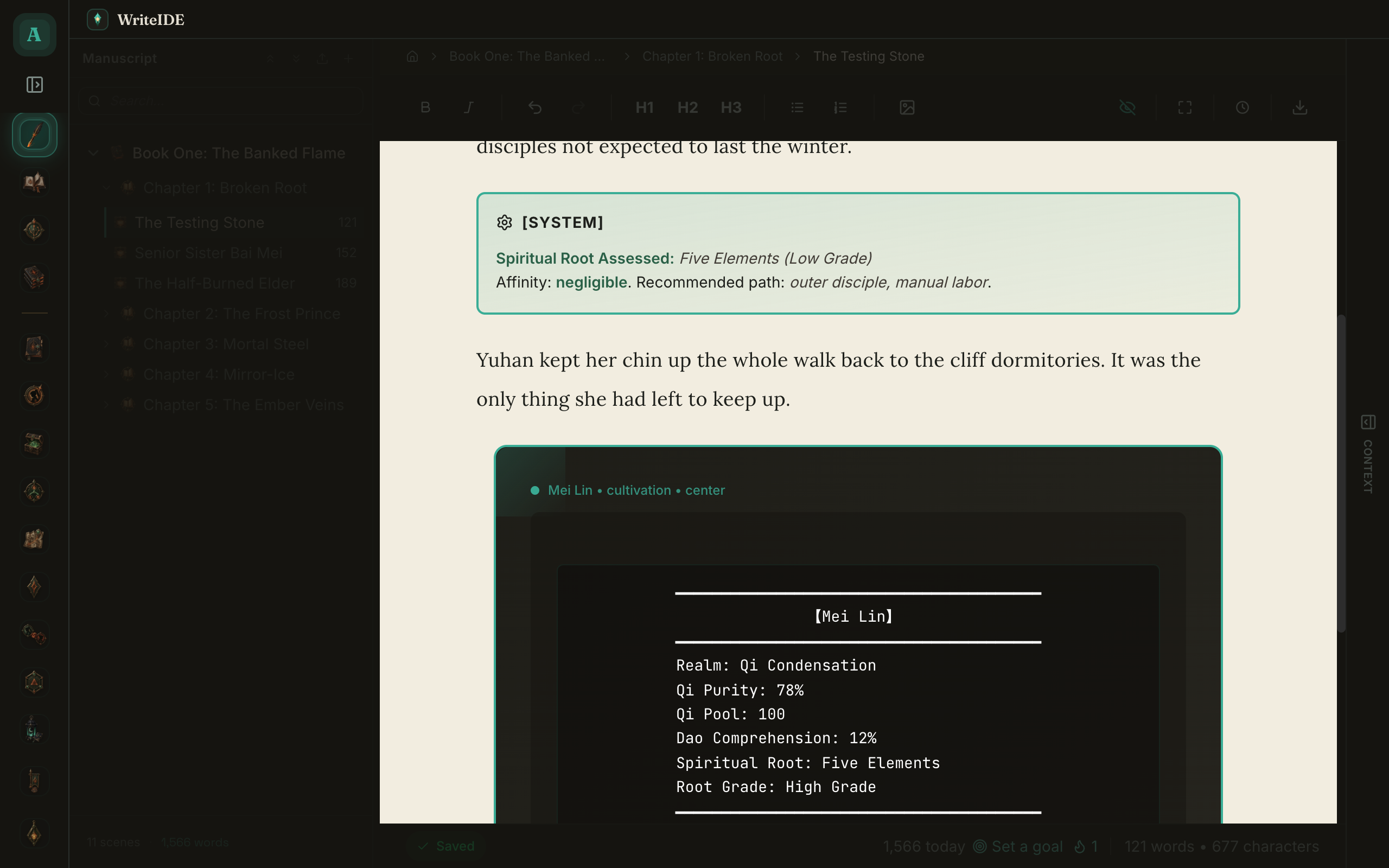
So when your protagonist's Vitality reads 42 in one chapter and 40 in the next with no event in between, it does not slip past. It can pull readers out of the story and show up in comments or reviews. The hard part is that the error is almost never in the chapter where it gets noticed. It is upstream, in some edit you made weeks earlier, and the visible symptom is sixty pages later.
You already know this if you have ever tried to fix one. You change a number early in the book, and now you have to trace every later scene that number touched. Did this item give a flat bonus or a percentage? Does that change the HP formula? Does the HP change matter in the fight where he almost died, because now he does not almost die? Continuity is not one error. It is a chain.
The real source: your manuscript and your stats disagree
Many authors end up with several copies of the same information. The prose lives in Word or Scrivener, the current numbers live in a spreadsheet, and the stat block in the chapter becomes another copy.
That setup can work, but every copy has to be updated by hand. A normal tracking sheet shows current values well; it only shows a full history if you build and maintain that history yourself. This guide explains why spreadsheets become harder to manage as a series grows.
The safer approach is to keep the manuscript and character records in one connected system, with each recorded change attached to a place in the story.
How WriteIDE catches continuity errors for you
WriteIDE keeps your manuscript and character records in the same project. When you record a stat change at a scene, the app remembers where in the story that change belongs. When you insert a native stat block, WriteIDE fills it from the character's saved information for that point in the story. You do not have to type the numbers into the block again.
That also means WriteIDE knows which scenes contain each character's stat blocks and where those scenes sit in the story.
Continuity alerts
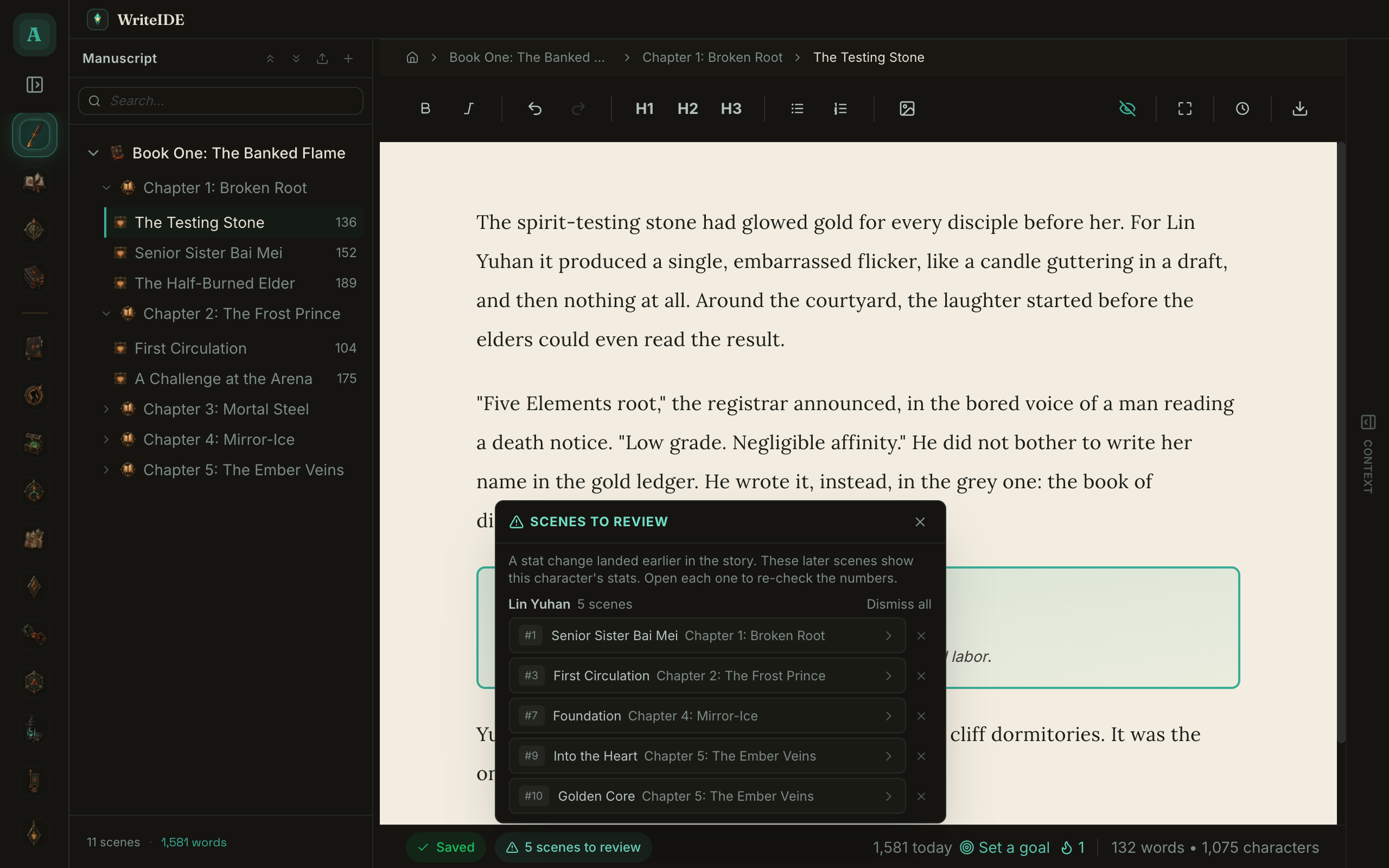
If you go back and record a corrected stat value before later saved changes for that character, WriteIDE checks the later scenes for that character's stat blocks. Each matching scene appears in a Scenes to review list, grouped by character.
Click a scene and WriteIDE opens it and marks that reminder handled. The list tells you where to look; it does not proofread the surrounding prose or decide whether the fight still makes sense.
Point-in-time, so the old numbers stay old
The trap with any fix is that you correct a number and accidentally rewrite history. You meant to fix Chapter 14, and now Chapter 9, where he had not found the ring yet, shows the boosted value.
Move the marker on a character sheet to an earlier scene and WriteIDE shows the character as they stood at that part of the story. A change recorded in Chapter 14 cannot appear in Chapter 9, because Chapter 9 comes first.
Existing stat blocks also remember when they were inserted. A later correction will not silently rewrite an old block behind your back. Later blocks may need a fresh look, which is exactly why the Scenes to review list exists.
The Power Curve gives you another view
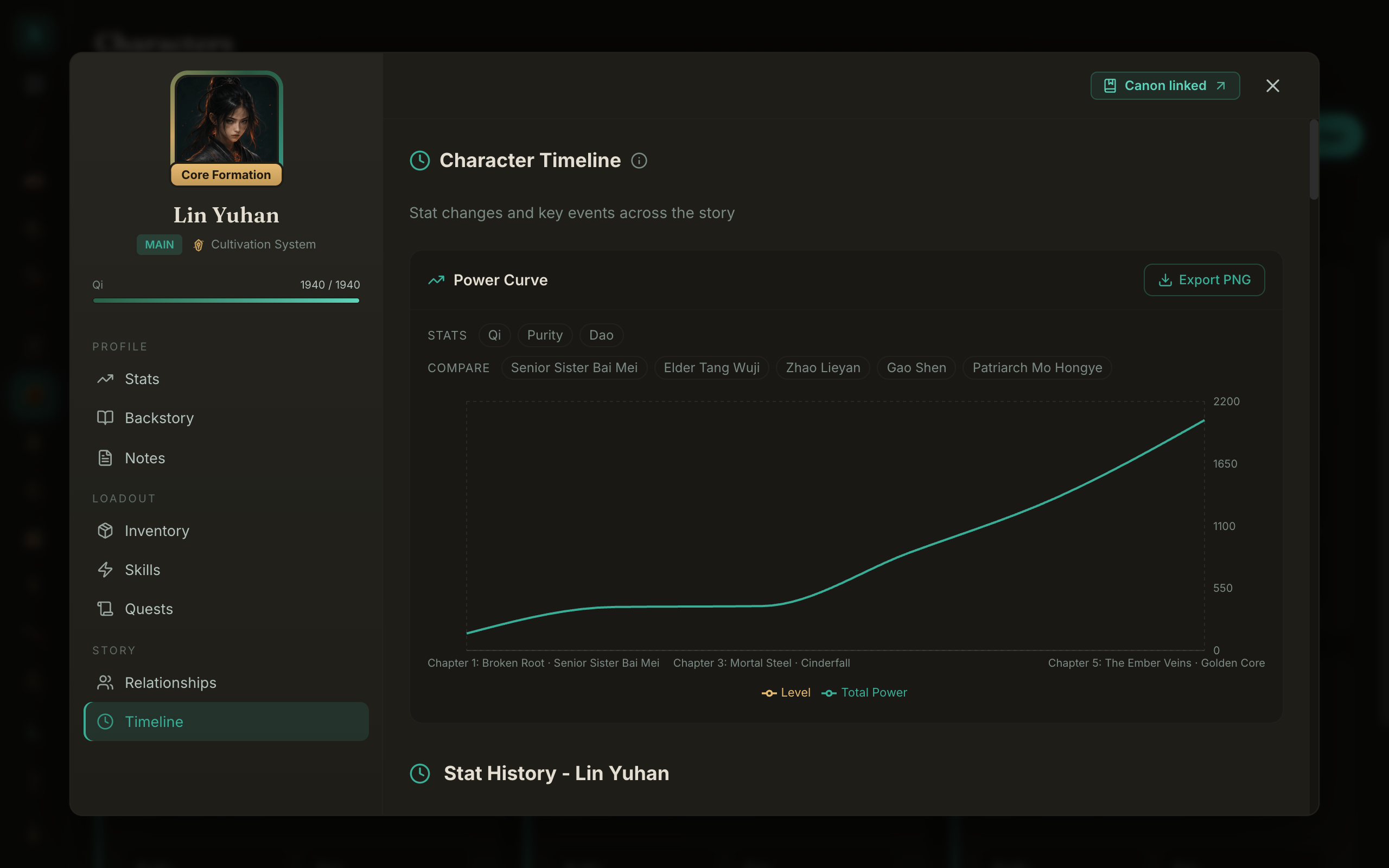
The Power Curve gives you a second way to inspect progression. It plots the character's recorded level and total power across the story, and you can add up to four other characters for comparison.
It can make a sudden jump easy to notice and give you a reason to reread that part of the book. It does not decide whether the pacing is good or bad for you. For help choosing the shape of the climb, see linear versus exponential growth.
For a worked ledger covering temporary buffs, scene moves, and the handoff between books, use the guide to keeping LitRPG stats consistent across a series.
A workflow that actually holds up
Here is the loop that keeps a long progression novel consistent, end to end.
- Define each stat once. Use a straightforward formula where it helps, such as
HP = VIT * 10 + Level * 5, and check the result in a real scene. - Record changes where they happen. If a character levels up or equips an item in a scene, save the change at that scene. A later stat block can then use the right point in the story.
- When the Scenes to review badge appears after an earlier correction, open and reread each listed scene.
- Use the Power Curve as a final visual check, then read the relevant scenes before publishing.
If you want a quick check outside the app, paste an earlier and a later stat block into the free Stat Block Continuity Checker. It lists every changed value and checks it against the level-up or loot receipts you expected, in your browser. It compares the two blocks you paste; it does not read your manuscript.
WriteIDE's manuscript exports render native stat blocks from their saved point in the story, so you do not have to rebuild them by hand. Always preview the result before posting. For Royal Road, use the HTML export; legacy BBCode remains available for destinations that still accept it. The Royal Road formatting guide walks through that workflow.
If you are not ready to change tools, the free LitRPG Stat Tracker logs each stat change against its chapter, so you can see what a stat was at any point and compare it with the stat block you wrote.
The point
You are not going to out-track your readers by being more careful. There are more of them, they have more time per chapter, and tracking your numbers is half of why they showed up. The only way to win is to stop hand-copying numbers between three places that quietly disagree, and let one source of truth do the reconciling. Catch the error in a flagged list on your screen, not in a pinned comment under Chapter 60.
WriteIDE is free and available for Apple-silicon macOS, 64-bit Windows, and 64-bit Linux. The current stable app requires no account. Your manuscript and character data stay in local files and a local database on your computer. Download WriteIDE and keep the story and its numbers together.
More in Workflow
Keep LitRPG stats consistent with a worked stat ledger, rules for temporary buffs, and a revision checklist you can use across chapters and books.
6 min readWhen a LitRPG Spreadsheet Stops Being EnoughA spreadsheet can be a good start. Here is how to recognize when rewrites and stat blocks need a story-aware history.
2 min readHow to Make a Royal Road Blue Box: A LitRPG Formatting GuideMake a Royal Road blue box with a free generator, a worked level-up example, and a 35-second walkthrough. Copy the HTML and check your chapter before publishing.
5 min readNotes worth sending
Release notes when a version ships, plus Lab notes and guides. No weekly filler.