How to Make a Royal Road Blue Box: A LitRPG Formatting Guide
The safest Royal Road formatting is formatting you can inspect before readers see it. For a LitRPG system message, that usually means a small HTML table with inline colours, a clear title, and text that still makes sense if some styling changes.
The free Royal Road Blue Box Generator builds that table in your browser. It requires no account and neither uploads your chapter nor publishes to Royal Road. You copy the generated HTML, place it in Royal Road's source editor, then return to the visual editor and preview the chapter yourself.
Build one complete level-up box
Suppose a chapter ends with a character reaching level 10. Open the Blue Box Generator and use these values:
Colour preset: System (blue)
Box title:
Level Up
Body lines (one per line):
You have reached Level 10.
Skill unlocked: Ember Step.
Stat rows:
| Label | Value |
|---|---|
| Strength | 24 (27) |
| Agility | 18 |
Leave Box width at 60% and keep Center the body lines checked. The title and body span both columns; each optional stat row becomes a left-aligned label and right-aligned value. Blank lines are removed. The preview should read:
Level Up
You have reached Level 10.
Skill unlocked: Ember Step.
Strength                 24 (27)
Agility                  18
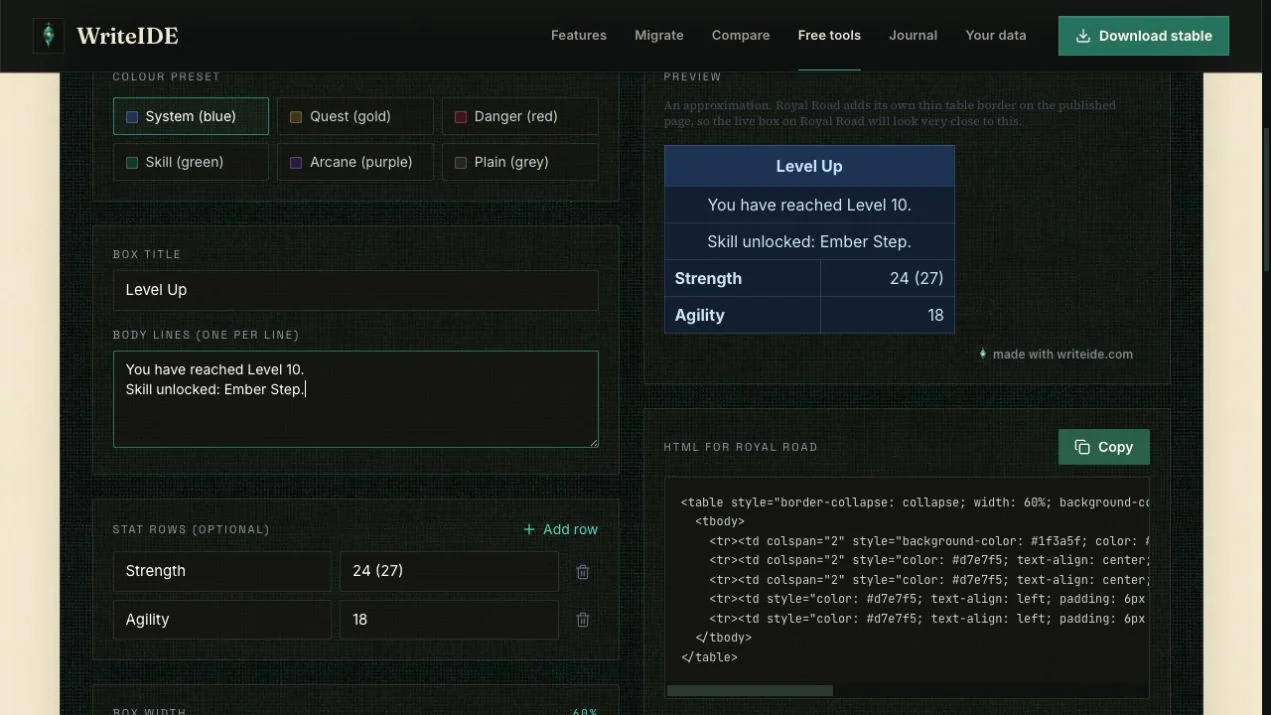
The HTML panel updates as you type. Press Copy in the HTML for Royal Road panel when the preview is ready. The separate PNG control is for places such as social posts where chapter HTML does not render; for a Royal Road chapter, use the HTML.
You can also download this example's generated HTML as a text file. Open the file, copy the complete table, and follow the placement steps below. Replace the sample words and values with your own before publishing.
Move the box into a Royal Road chapter
Keep a copy of the chapter outside Royal Road before changing its source. Then:
- Open New Chapter, an existing chapter, or a saved draft in your Royal Road author dashboard.
- Put the surrounding prose in place first and save the draft.
- In the chapter editor toolbar, open the source-code view. Royal Road currently exposes a direct HTML editor; the control is commonly shown with a
<>code icon. - Find the exact break between the paragraphs where the notification belongs. Paste the copied
<table>...</table>there without replacing the surrounding chapter HTML. - Leave source view and inspect the table in the visual editor. Correct missing text or an accidental placement before doing anything else.
- Use Royal Road's chapter preview. Check the prose immediately before and after the box, the two stat columns, text contrast, and the result at a narrow screen width. Publish only after that review.
If the chapter itself starts in Google Docs or Word, run it through the Google Docs to Royal Road HTML Cleaner first so the surrounding prose pastes cleanly.
Royal Road's official chapter guide recommends the visual table editor for casual table work and warns that external table pastes can lose properties. It also documents the direct HTML editor and a preview step. Toolbar labels can change, and Royal Road may strip or override markup, so treat the generator preview as an approximation rather than a paste guarantee.
The generator deliberately uses a conservative table structure and inline background colour, text colour, alignment, and bold styling. Royal Road supplies its own thin table border, and custom borders or rounded corners may not survive on the published page. Recheck an older chapter if Royal Road changes its editor or theme.
Keep the message readable without the colour
A system box is a pause in the story, not a substitute for the story. Put the important result in words: who changed, what changed, and what choice or consequence follows. A reader should still understand that the character reached level 10 and unlocked Ember Step if a background colour disappears.
Use a short title, one idea per body line, and only the stat rows the scene needs. A full character sheet inside every notification slows the chapter and makes mobile checking harder. If you need a large sheet, build it as a separate stat block and introduce it in the prose. The LitRPG Character Sheet Generator builds one as Royal Road HTML, the Royal Road Table Generator handles inventory and status tables, and the Author Note Box Builder frames chapter-end notes and hiatus notices with the same copy-the-HTML workflow.
Legacy BBCode remains useful for forums and editors that explicitly accept it. For a current Royal Road chapter, use the HTML source workflow above instead of assuming an older [table] example will be accepted.
Formatting is not stat history
The free generator formats literal text. It does not know whether Strength should be 24 in this scene, calculate the equipment-adjusted 27, or update another box when you revise an earlier chapter. If the value changes, you must change the pasted HTML yourself.
WriteIDE 0.7.2 handles the longer workflow inside the manuscript. Type /bluebox in a scene to insert an editable system-message block. Keep changing character values through the tracked stat tools, and use stat blocks when you need values from a particular point in the story. When the chapter is ready, open Publish → Copy for Royal Road. The review shows Royal Road HTML and legacy BBCode, and reports unsupported formatting before you copy. Copying stays local to the clipboard; WriteIDE does not sign in to Royal Road or publish the chapter.
That distinction matters during revisions: presentation answers “how should this box look?”, while stat history answers “what was true at this scene?” For a larger continuity pass, review the scenes affected by an earlier stat correction. You can also download the current free WriteIDE release for macOS, Windows, or Linux.
More in Publishing
Keep LitRPG stats consistent with a worked stat ledger, rules for temporary buffs, and a revision checklist you can use across chapters and books.
6 min readHow to Catch Continuity Errors in Your Stat Blocks Before Readers DoA changed stat in an early chapter can ripple through the rest of a book. Here is how WriteIDE helps you find the scenes worth checking before you publish.
6 min readWhen a LitRPG Spreadsheet Stops Being EnoughA spreadsheet can be a good start. Here is how to recognize when rewrites and stat blocks need a story-aware history.
2 min readNotes worth sending
Release notes when a version ships, plus Lab notes and guides. No weekly filler.