Free LitRPG writing software · WriteIDE 0.7.3
Your manuscript. Your world. Every level in between.
Write scenes, build stat systems, track equipment and quests, and keep your world connected to the story. WriteIDE brings writing, progression tracking, publishing, and a Reader Codex into one local workspace.
Available for macOS, Windows, and Linux. No account required. Release notes
Writing
A writing workspace that grows with your story
Draft a scene, work through a whole chapter, or organize a series. Your character system is there when you need it, and optional when you just want to write.
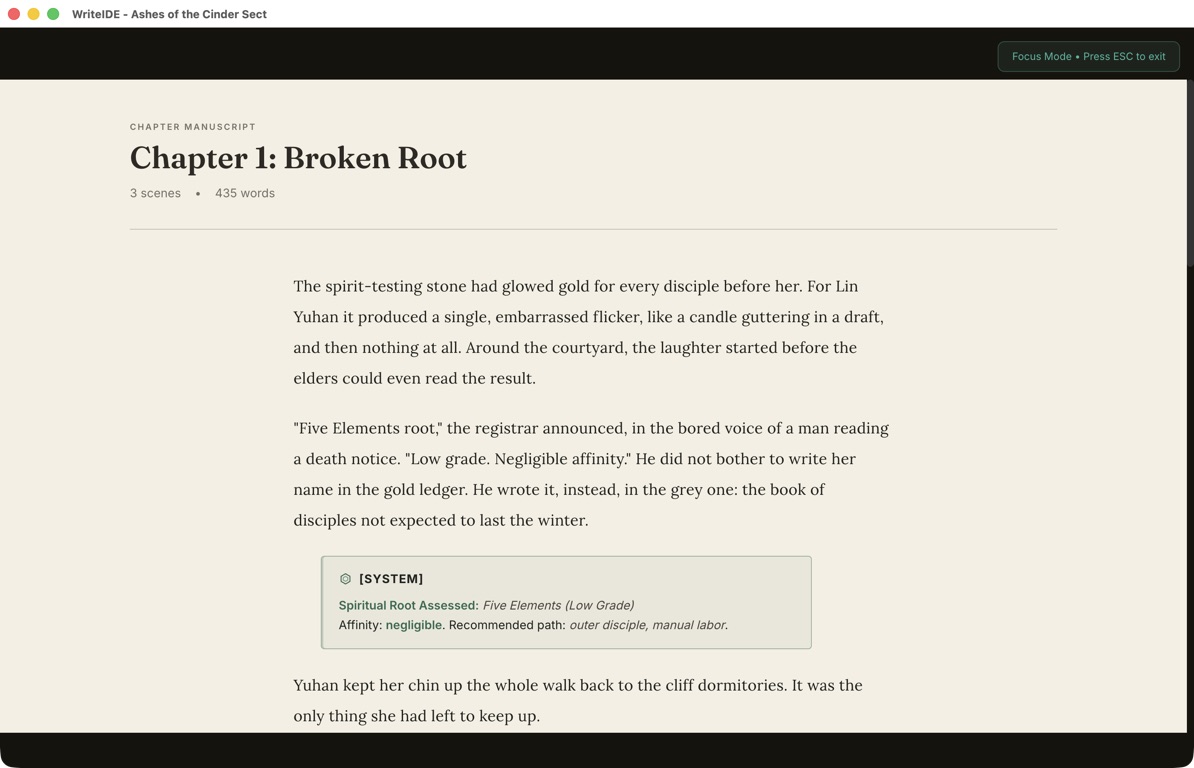
Project library and switching
Create, open, rename, and manage separate story projects.
Whole-chapter editing / Scrivenings
Edit adjacent scenes together while retaining scene boundaries.
Focus Mode
Reduce surrounding workspace controls in scene/chapter writing; return with Escape.
More in Writing (13)
Four starting paths
Blank writing, manuscript import, tracker, or sample demo; guided first-session tasks.
Tracker-only projects
Keep writing elsewhere while maintaining character and world records; chapter skeleton optional.
Multi-book manuscripts
Books contain chapters and scenes inside one project.
Book, chapter, and scene ordering
Drag books, chapters, and scenes into story order, or move scenes between chapters and books.
Scene merge
Combine scenes through manuscript actions while keeping the writing in one place.
Automatic saving and save feedback
Write with automatic saving and visible save feedback.
Rich text
Headings, bold, italic, underline, lists, quotations, links, and code formatting.
Local manuscript images
Insert locally stored images into manuscript; output support varies by format.
Scene metadata and notes
Keep synopsis, POV/context, scene notes, and character/quest associations beside prose.
Word counts
See scene, chapter, and project word totals, including supported structured writing blocks.
Project typography
Font, size, line spacing, inherited defaults, and typewriter centering; local writing appearance.
Light and dark themes
Ink & Moss / Nightjade workspace appearances.
Planning
Plan the next beat. See the shape of the book.
Work from scenes, outline before drafting, or mix both. Keep plot structure and progression pacing together as your plan changes.
Three planning modes
Discovery, Outline-First, and Hybrid; planned beats can exist before manuscript scenes.
Scene framework worksheets
Story Grid, Scene / Sequel, and Emotional Arc lenses; synopsis plus structured planning fields.
15 plot templates
Ten LitRPG arcs and five classic structures; beat purposes, prompts, pacing notes, pitfalls.
More in Planning (9)
Three outline layouts
List, grid, and board views over shared planning data.
Planned beats
Create, reorder, edit status and notes; promote planned beats into scenes.
Beat-to-scene links
Bind/rebind planning beats to existing scenes.
Story arcs
Group beats into named/color-coded arcs.
Progression in outline
Power-curve lane and stat-pacing notes alongside plot structure.
Scene and project find/replace
Search within scene or across project; match case, whole words, grouped results, replacement.
Daily writing target
Configurable daily word goal with project writing progress.
Writing activity and streaks
Review writing activity history and streak/progress indicators.
World-aware spellcheck
Native corrections plus known world-name suggestions and dictionary additions.
Stat systems
Build the rules your world actually uses
Design your own attributes and formulas, start from a template, and give different characters the systems they need.
Six attribute types
Integer, decimal, percentage, tier, boolean, and text definitions.
Multiple stat systems
Different character groups can use different systems within one project.
Derived-stat formulas
Resolve calculated stats from other attributes, including chained dependencies.
More in Stat systems (13)
Character dossiers
Stats, backstory, notes, relationships, inventory, skills, quests, and history within character context.
Portraits and character identity
Add portraits, descriptions, and aliases connected to each character’s world record.
Custom stat definitions
Author-defined names, short names, limits, defaults, growth, and calculated fields.
Starter stat systems
D&D-style, cultivation, tier-based, and skill-oriented starting points.
Template browser
Search and filter curated stat systems, then inspect their definitions before applying them.
Custom system editing
Create, edit, and duplicate your own stat-system definitions.
Template file import/export
Import and export stat-template files, with review for conflicting definitions.
Apply systems to characters
Add a stat system while preserving existing character values. New attribute definitions become available to characters using that system.
Formula validation
Check formula syntax and dependencies, and inspect growth and attribute-importance reports.
Level-up preview
Review progression and resulting stat changes before recording a level-up.
Current and maximum resources
Track remaining HP and MP separately from maximum values, with recorded changes at story scenes.
Record reasons for changes
Save explicit stat edits with reasons and story positions.
Typed historical values
Preserve text, tier labels, and true/false values in character views and History.
Progression
Watch your cast change across the story
Move through the manuscript on a shared story-position dial. Inspect character growth, compare the party, and return to the scene behind a change.
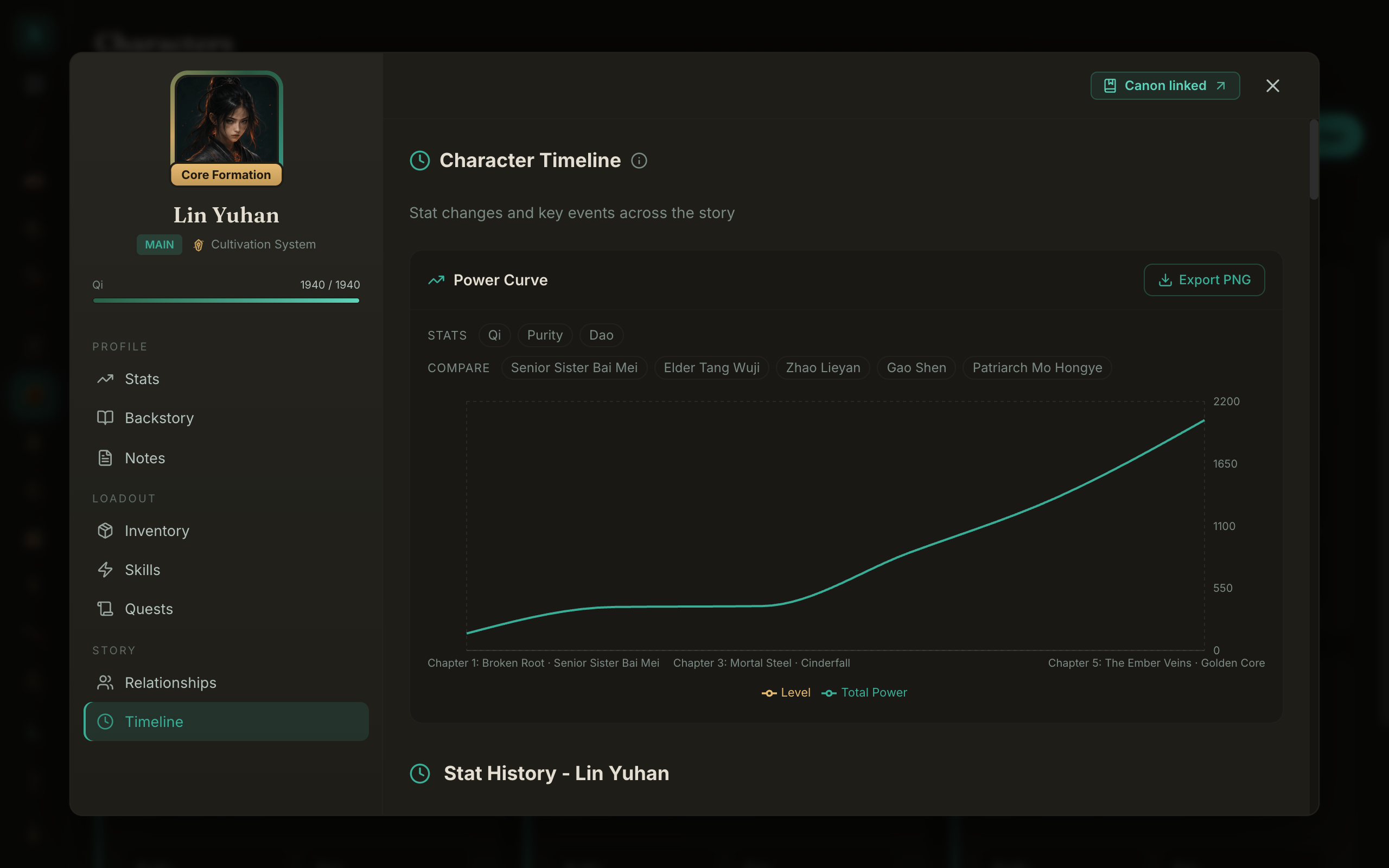
Character Power Curve
Plot recorded level and total power across story positions.
Party comparisons
Overlay up to four additional characters' total power.
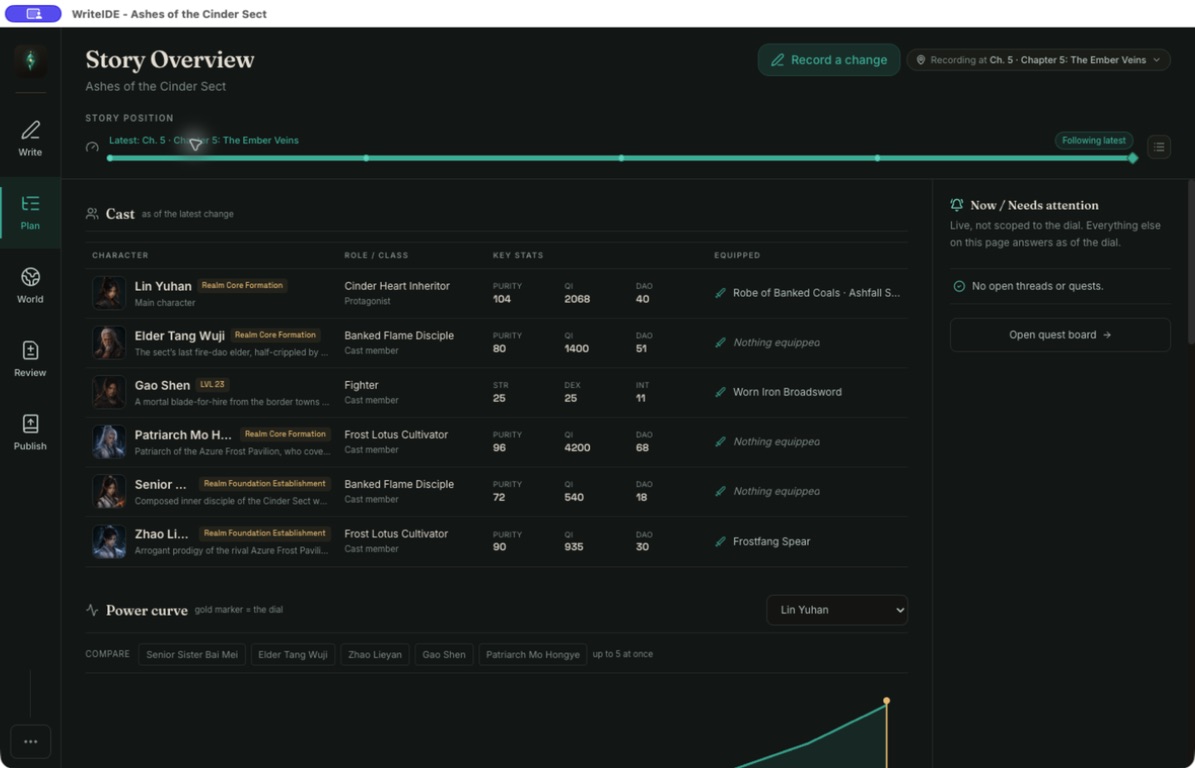
Story Overview
Cast cards, power views, faction tiles, and changes in one story-wide workspace.
More in Progression (10)
Class workspace
Create/edit class archetypes and associate them with stat systems.
Class growth overrides
Set per-level attribute growth by class; show level-10 projections.
Starter classes and members
Built-in starters plus current class membership roster.
Scene-linked class changes
Assign, change/evolve, or remove classes with recorded history.
Class-aware level-ups
Use class-specific growth when recording a level-up. Existing level-up records stay as recorded if you later edit the class.
Individual stat series
Toggle attribute series to inspect growth.
Recent change feed
Inspect recorded progression activity and navigate to linked scenes.
Scene-free tracker overview
Show current values without inventing a manuscript timeline.
Stat blocks
Put the system on the page, then review its history
Write editable system messages and insert character or quest displays. Saved stat blocks preserve their story boundary so you can inspect earlier choices.
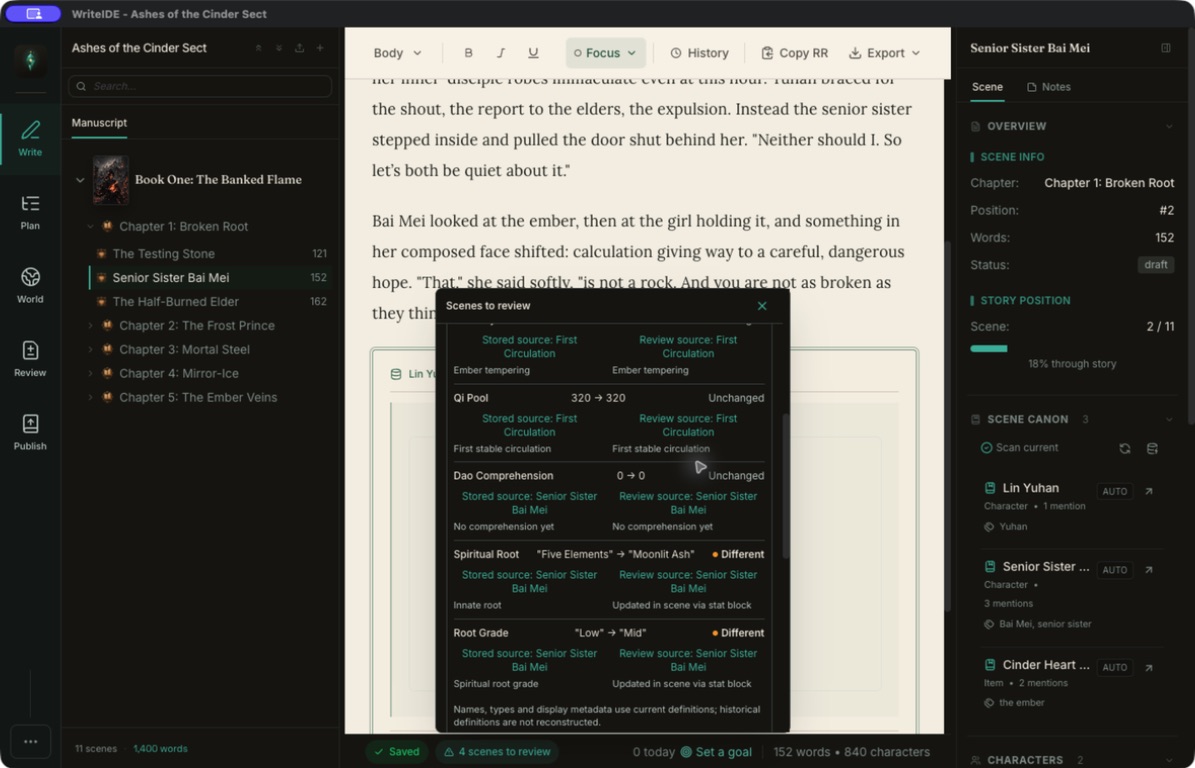
Stat-block display styles
Multiple built-in formats, including compact, detailed, skills/cultivation, and field-list styles.
Named stat-block presets
Reuse saved layout, field selection, and alignment; presets store choices rather than old numbers.
Scenes-to-review worklist
Earlier corrections can identify later saved stat-block scenes for author review.
More in Stat blocks (10)
Native point-in-time stat blocks
Insert character displays tied to the scene and the point in time when the block was saved.
Select fields and alignment
Choose displayed stats and block alignment without changing underlying values.
Stat block inspection
Compare saved typed base values with review-time values and open the supporting scene. Prose, calculated totals, and remaining resources need separate review.
Native system messages / BlueBoxes
Editable system, achievement, warning, quest-style, and other message types; preview and inline editing.
Native quest blocks
Insert character-linked quest displays in manuscript.
Comparison results
See Different, Unchanged, or Unavailable results with the block’s recorded boundary and supporting scene.
Character History filtering
All changes / Needs review; inspect old/new values and recorded reasons.
Limited rule-based review
Check numeric bounds and review hints about stat decreases alongside your own continuity review.
Saved-block stability
A later correction does not silently replace the numbers in every old block. Review saved blocks before deciding what to change.
Equipment & skills
Remember what they carry, equip, and learn
Track quantities, trades, loadouts, bonuses, and skills where they happen in the story. Keep past equipment and ability use available for reference.
Visual loadout and list views
Inspect slots/equipment visually or as lists.
Trades
Transfer quantities between characters and record counterparties/history.
Charge-limited skills
Record uses, remaining charges, and expended state at story positions.
More in Equipment & skills (16)
Item catalog
Weapons, armor, accessories, consumables, quest items, currency, and materials; details/images/bonuses.
Inventory quantities
Track ownership and quantities per character, including partial transfers.
Scene-linked loot and giving
Record acquisitions at story positions; parsed loot supports multiple items and quantities.
Equip and unequip
Apply equipment bonuses while keeping historical equipment context.
Configurable equipment slots
Configure slot definitions and positions for character loadouts.
Equipment categories
Organize compatible equipment beyond default categories.
Item sets
Define set membership and piece-count bonus thresholds.
Equipment and modifier totals
Combine base stats, flat equipment bonuses, and percentage modifiers in calculated totals.
Historical item ownership
Inspect recorded holders, transfers, and quantities; unknown historical quantities remain explicit.
Historical inventory views
Reconstruct carried/equipped state at selected scene; historical details read-only where required.
Titles, buffs, and debuffs
Add modifiers, activate or deactivate them, and inspect their bonuses. Record when temporary effects end.
Custom rarity tiers
Project-specific names, colors, ordering, and rarity assignment.
Rarity-set transfer
Export a rarity set as JSON and import it into another project. Matching names merge while existing references and unmatched tiers are preserved.
Skill catalog
Define skills/abilities, categories, descriptions, and custom properties.
Skill acquisition and leveling
Teach and advance skills with scene-linked history.
Skill history
Inspect skill acquisition, level progression, and limited-use history. Custom cooldown notes describe your system; they do not run an automatic timer.
Quests & threads
Keep rewards and unfinished promises in view
Build quests with objectives, prerequisites, and rewards. Track the subplots, promises, and goals that still need a place in the manuscript.
Structured objectives
Kill, collect, location, conversation, item-use, level, and custom objectives.
Quest lifecycle
Assign, start, update progress, complete with rewards, or fail at story scenes.
Manual plot-thread board
Track quests, subplots, promises, and goals across project.
More in Quests & threads (8)
Quest definitions
Main, side, daily, and achievement-style quests; difficulty and descriptive fields.
Quest prerequisites
Link prior quests, level/stat/item requirements, and custom conditions.
Quest rewards
Configure XP, items, skills, stat boosts, currency, and titles.
Character quest logs
Current or historical quest state within character context.
Quest-log insertion
Insert a character’s quest-log text through the command palette.
Thread status and importance
Introduced, active, progressing, completed, failed, abandoned; importance and character associations.
Thread age and health indicators
Review status, importance, and time since a recorded mention to spot plot threads you may have left behind. These indicators use your records.
Thread-to-quest links
Link an open plot thread to a quest or create quest from thread.
Worldbuilding
A world library connected to the manuscript
Keep names, aliases, appearances, relationships, locations, and factions in connected records. Use reveal positions to inspect what a reader should know.
Aliases and name consistency
Maintain alternative names connected to same identity.
Mentions and appearances
Scan known names/aliases, inspect occurrences, navigate to manuscript scenes.
Reveal controls / Spoiler Shield
Record reveal positions and inspect knowledge through selected reader position.
More in Worldbuilding (16)
Unified Canon library
Search/filter world entries linked to specialized character/item/skill/class/location/faction/quest records.
12 Canon entry types
Organize characters, NPCs, creatures, companions, items, skills, classes, locations, factions, quests, glossary terms, and custom entries.
Manual Canon links and annotations
Connect selected prose to world records and keep anchored comments and story events.
World profiles
Portrait, biography, facts, bonds, appearances, and connections in one dossier.
Archive and restore Canon entries
Retain archived world records without keeping them in default library view.
Canon continuity dashboard
Review ambiguous mentions, missing links, and actionable record issues.
Spoiler-leak review
Identify recorded mentions preceding configured reveal boundaries; author review required.
Character relationships
Typed bonds, direction/strength, notes, and linked characters.
Relationship graph
Visual relationship network in addition to list/detail views.
Relationship events and history
Record scene-linked changes and inspect relationships at past story positions.
Location hierarchy
Organize regions, cities, dungeons, and sublocations.
Location dossiers
Danger, population, climate, terrain, resources, local elements, NPCs, and linked quests.
Factions
Organizations with leadership, goals, territories, descriptions, and crests.
Faction memberships
Characters, ranks, and membership records.
Faction power history
Record power dimensions and changes at scenes; inspect history and Overview tiles.
Faction relationships
Track alliances/rivalries and associated notes.
Import & spreadsheets
Bring your manuscript and your numbers
Import existing prose or start a tracker from CSV or Excel. Review the proposed structure and values before creating or changing records.
TXT, Markdown, and DOCX import
Import TXT, Markdown, or DOCX and review the detected books, chapters, and scenes before creating them.
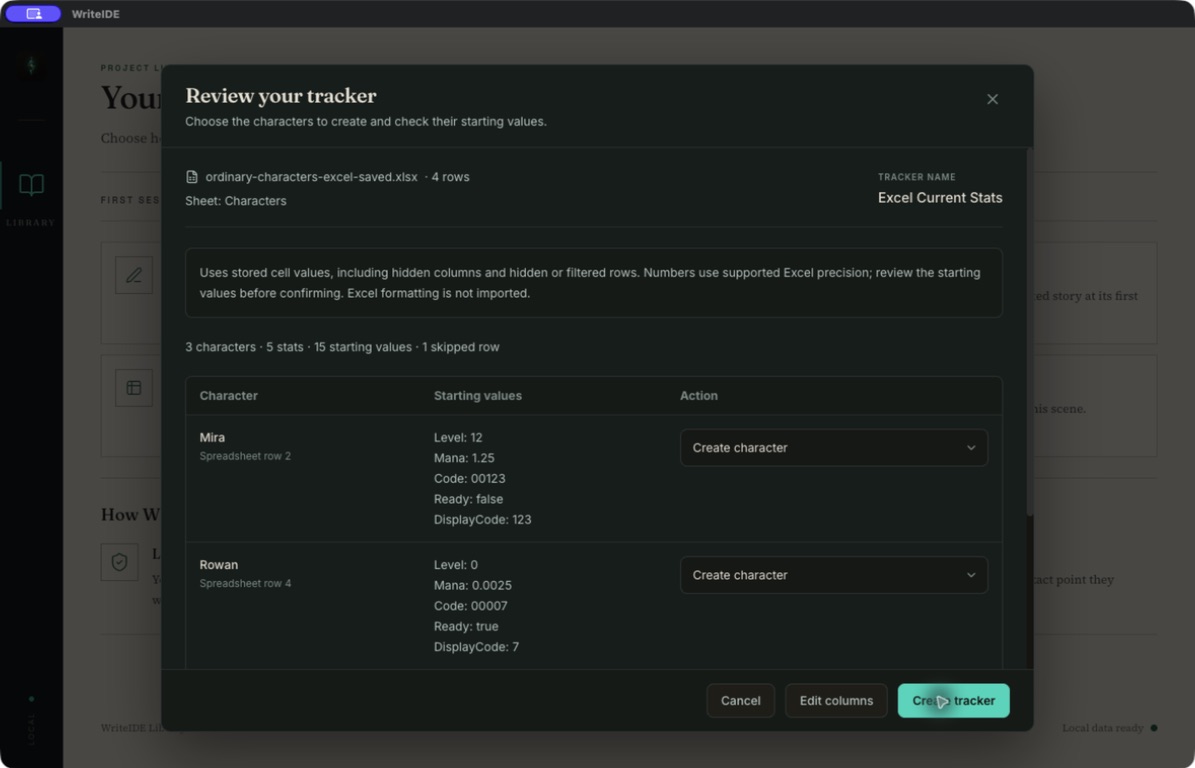
New CSV/Excel tracker
Map a character-name column and typed stat columns, select rows, and review starting values before creating a tracker.
Repeat workbook imports safely
Reimport an unchanged WriteIDE workbook without adding duplicate history events.
More in Import & spreadsheets (8)
Headingless/single-chapter handling
Review and import prose even when it has no chapter headings or belongs in one chapter.
Import review and cancellation
Choose the structure and content before importing. Cancel the review without creating manuscript records.
Spreadsheet text and blank fidelity
Preserve leading-zero text when typed as text; blank stats unset; reject unsupported numeric precision.
Spreadsheet formula boundaries
Skip ordinary formula cells before tracker import. Convert array or data-table formulas to literal values first; unsupported numeric precision is refused.
Existing-project stat import
Preview and apply supported changes from a WriteIDE workbook or compatible CSV to an existing project. Use the new-tracker flow to map a different spreadsheet layout.
Canonical workbook export
Export a WriteIDE workbook containing supported stat definitions, story positions, tracked values, and history.
Current-stats CSV
Export current typed base and resolved calculated values, including trackers with no scenes. Equipment bonuses, remaining resources, and history are separate.
Interrupted export recovery
Identify/reveal partial destination files and require explicit cleanup before retry.
Export & sharing
Prepare your chapter for its next destination
Compile a manuscript, copy a Royal Road chapter, or save a share card. Choose the content and formatting appropriate to the destination.
HTML export
Web-oriented manuscript with structured blocks and selected templates.
Royal Road copy
Review current chapter, report unsupported formatting, copy HTML or legacy BBCode to clipboard.
More in Export & sharing (13)
Scoped manuscript compile
Choose the available scene, chapter, or manuscript scope and select content for export.
Markdown export
Portable text with supported WriteIDE block restoration markers.
DOCX export
Create a Word manuscript with images and stat blocks, Letter or A4 pages, and title-page, header, and page-number options.
PDF export
Create a 6 × 9-inch manuscript PDF with supported embedded PNG and JPEG images.
EPUB export
Packaged manuscript XHTML and bundled supported images for e-readers.
Legacy BBCode export
Forum markup where destination accepts it; separate from Royal Road HTML workflow.
Chapter Stat Changelog
Point-in-time stat sheets and chapter changes in Markdown.
World Bible PDF
Select world records/details for reference; author or reader-safe edition with configured boundary.
Custom HTML system-message templates
Customize system-message layouts with title and content placeholders. Available for HTML export and Royal Road copy.
Custom HTML stat templates
Customize stat-block layouts with character names, classes, and stat fields. Set project defaults or choose per export; available for HTML and Royal Road copy.
Reader Codex
Give readers a world they can explore safely
Build a linked companion encyclopedia through the latest chapter you choose. Readers can look back within that boundary as the records follow their position.
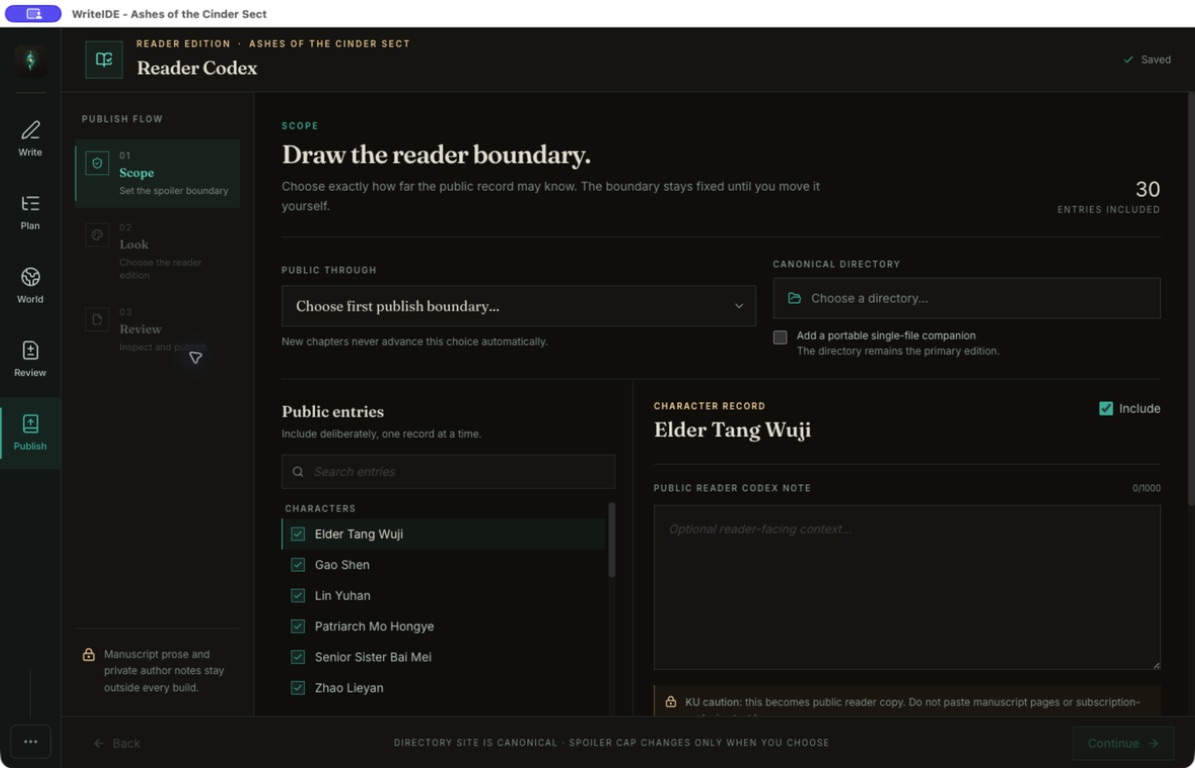
Latest-safe-chapter cap
Choose the latest chapter readers may explore and build their encyclopedia through that point.
Linked reader encyclopedia
Characters, items, skills, quests, factions, locations, glossary, relationships, and Chronicle.
Folder-site output
Generate a folder of static website files for the host you choose.
More in Reader Codex (9)
Persistent publishing workspace
Save scope, appearance, output, and selected-entry settings.
Reader stat and progression state
Display stats, classes, equipment, inventory, skill uses, and quest state appropriate to reader position.
Selected media
Include supported portraits, item art, covers, crests, and location images.
Three visual themes
Configure static companion-site appearance.
Portable HTML output
Generate self-contained companion file for sharing.
Prepublication receipt
Review included and withheld entries and the spoiler and privacy checks before publication.
Fresh-build requirement
Build and review again after changing the project or publishing settings, so the shared output reflects the current selection.
Local release snippets
Prepare and copy sharing text from the publishing workspace, then post it to your chosen destination yourself.
Versions & backups
Make room to revise with a way back
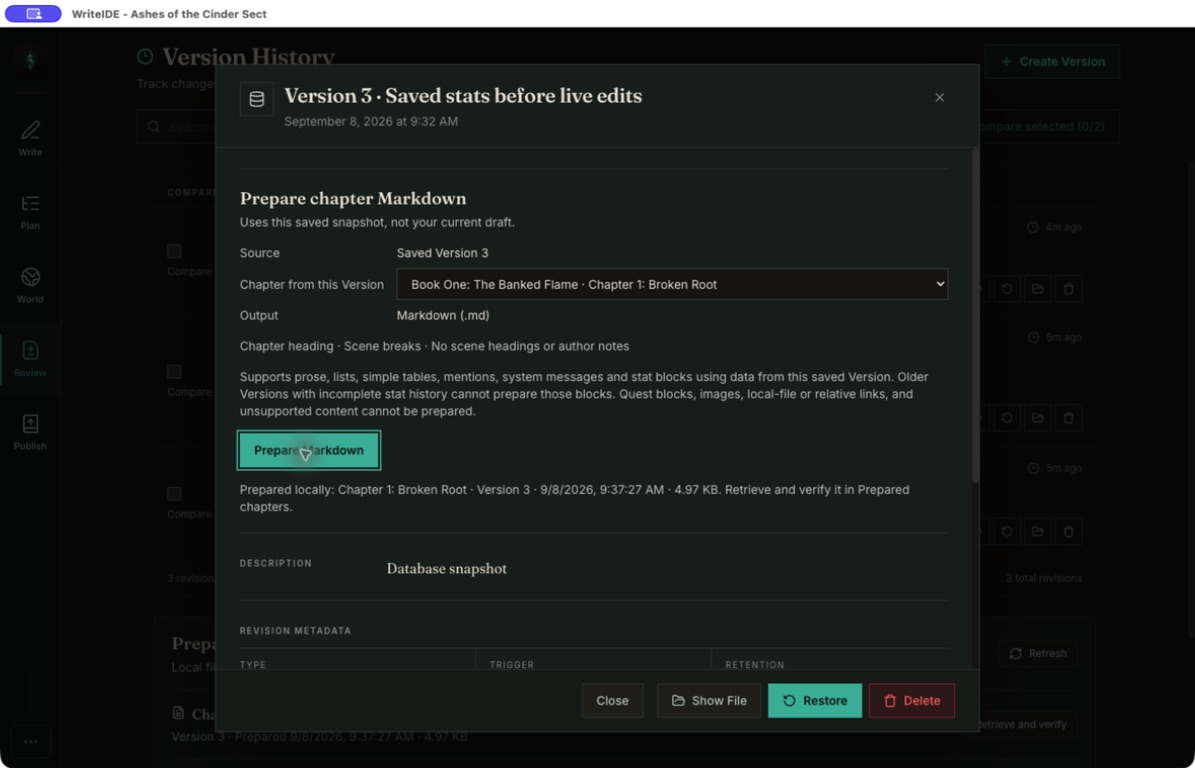
Save versions, compare drafts, and restore project snapshots. Prepare a saved chapter for reference while you continue writing.
Manual versions and milestones
Create labeled restore points with descriptions/tags.
Project version restore
Restore saved project state with backup of current state before replacement.
Scheduled backups
Create automatic local project snapshots and manuscript backups as you work.
More in Versions & backups (15)
Automatic version history
Keep automatic revision records alongside manual milestones, with retention settings.
Search/filter versions
Find saved versions by label, type, or what created them, then inspect their details.
Version comparison
Select two saved project versions to compare their contents.
Prepared saved chapters
Choose a chapter from a saved version and prepare its supported content as Markdown.
Persistent prepared artifacts
Retrieve, copy, or reveal prepared file after later edits and restart.
Prepared/current comparison
Compare the prepared chapter with your current draft using highlighted differences.
Prepared-chapter format checks
Saved-chapter Markdown preparation reports unsupported images, linked quests, protected Office content, and local links. Other manuscript export formats have different content support.
Manual backup packages
Create a snapshot and a portable backup package on demand, with a separate result for each.
Snapshot-file restore
Restore a WriteIDE snapshot in its matching project, with validation and recovery checks.
Backup location and status
Reveal backup folder, see snapshot counts/times and separate failure states.
Older-profile migration
Find an older WriteIDE profile and review its import into the current app while preserving the original.
Local project storage
Keep manuscript and world records in local files and a local database. Core desktop use requires no account.
Desktop platforms
Public builds for Apple-silicon macOS, 64-bit Windows, and 64-bit Linux.
Updates and release notes
Check for desktop updates and read What’s New in the app.
Help, shortcuts, and replay
Find commands with Cmd/Ctrl+K, jump to scenes, review keyboard shortcuts, replay guidance, and report a problem.
Free · local-first
Start with the story you already have.
Start with an empty manuscript, import TXT, DOCX, or Markdown, or bring a CSV or Excel tracker. You can also keep drafting in your current editor and use WriteIDE for the story’s records. No account is required. WriteIDE 0.7.3 is available for macOS, Windows, and Linux. Read the release notes for its exact scope and limitations.