Our biggest update yet: WriteIDE 0.6.0
The class system in this release began with one sentence from a reader: "A Berserker's stat distribution per level would be different to a priest's."
He was right. WriteIDE could track levels and stats, but it was missing the rule that explains why two characters grow differently. I started there. By the time 0.6 was ready, that work had reached the whole app.
This is the largest WriteIDE update so far. The interface has been rebuilt as an editorial studio, Reader Codex can turn tracked world data into a spoiler-safe companion site, Windows builds are signed, and several quiet limits and failure states that could get in an author's way are gone.
Here is what changed, in plain terms.
The whole app has been redesigned
WriteIDE had grown one feature at a time. The parts worked, but too many screens still felt like separate tools sharing a sidebar. I went through every active screen and the dialogs, pickers, and panels around them and gave the app one visual language.
The editor now reads like a writing desk. World data lives in library and dossier views. Story planning, revision history, settings, onboarding, and command dialogs follow the same rules. Dark book-cloth surfaces organize the workspace, warm paper is reserved for manuscript and authored content, and jade marks the current selection or confirmed state.
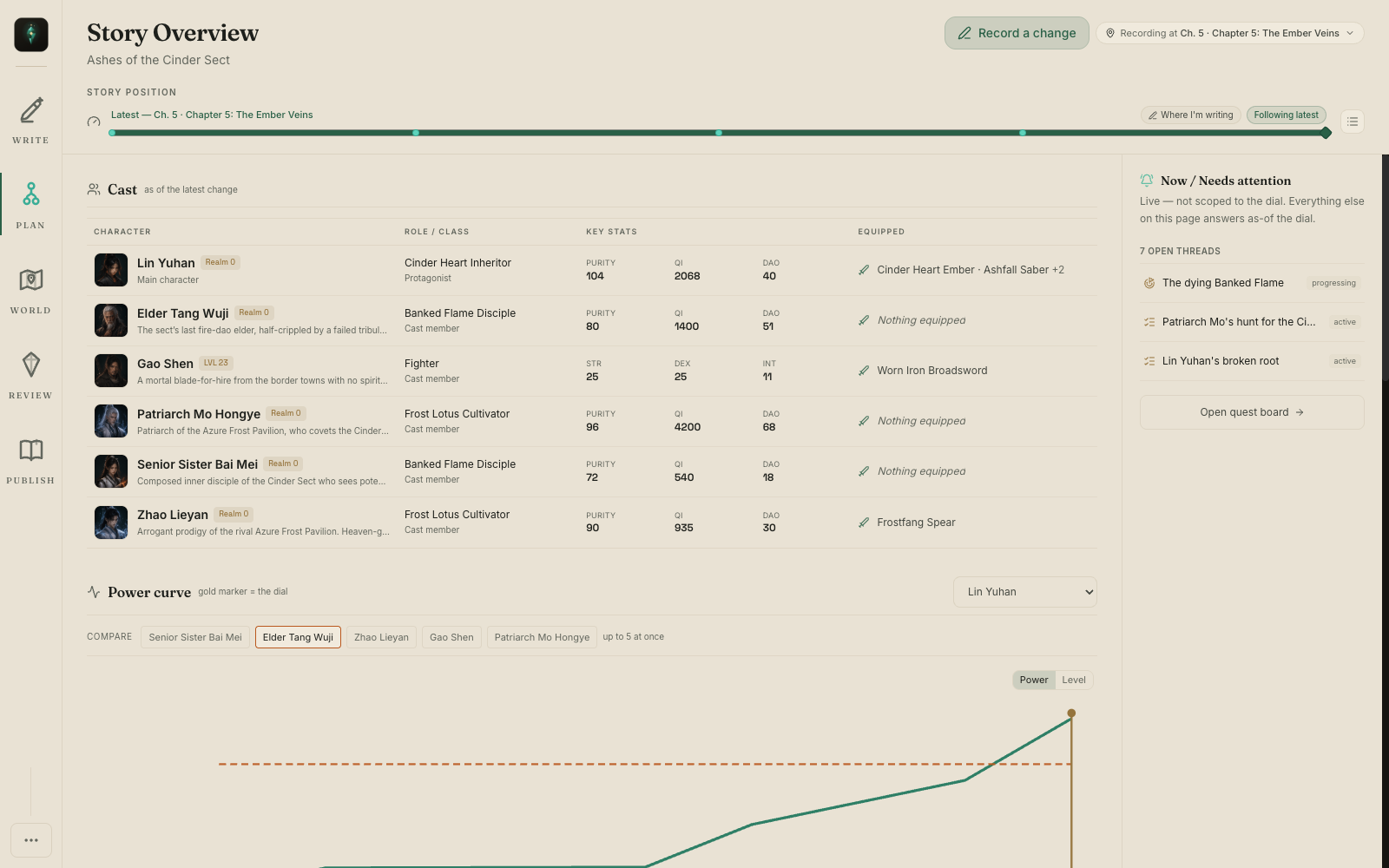
This pass covered the editor, Outline, Story Overview, characters, items, skills, quests, classes, Canon, relationships, locations, factions, stat systems, version history, settings, Help, the project library, and the active dialogs behind them. It works in the Nightjade and light themes, down to a 1200 by 700 window, with reduced-motion behavior where the system asks for it.
The point was simple: WriteIDE should feel like an author's private editorial studio. It finally does.
New: Character classes that drive growth
Classes are part of the story model now. You can define a class for a stat system, set its growth rates, and record when a character gains, changes, evolves, or loses that class.
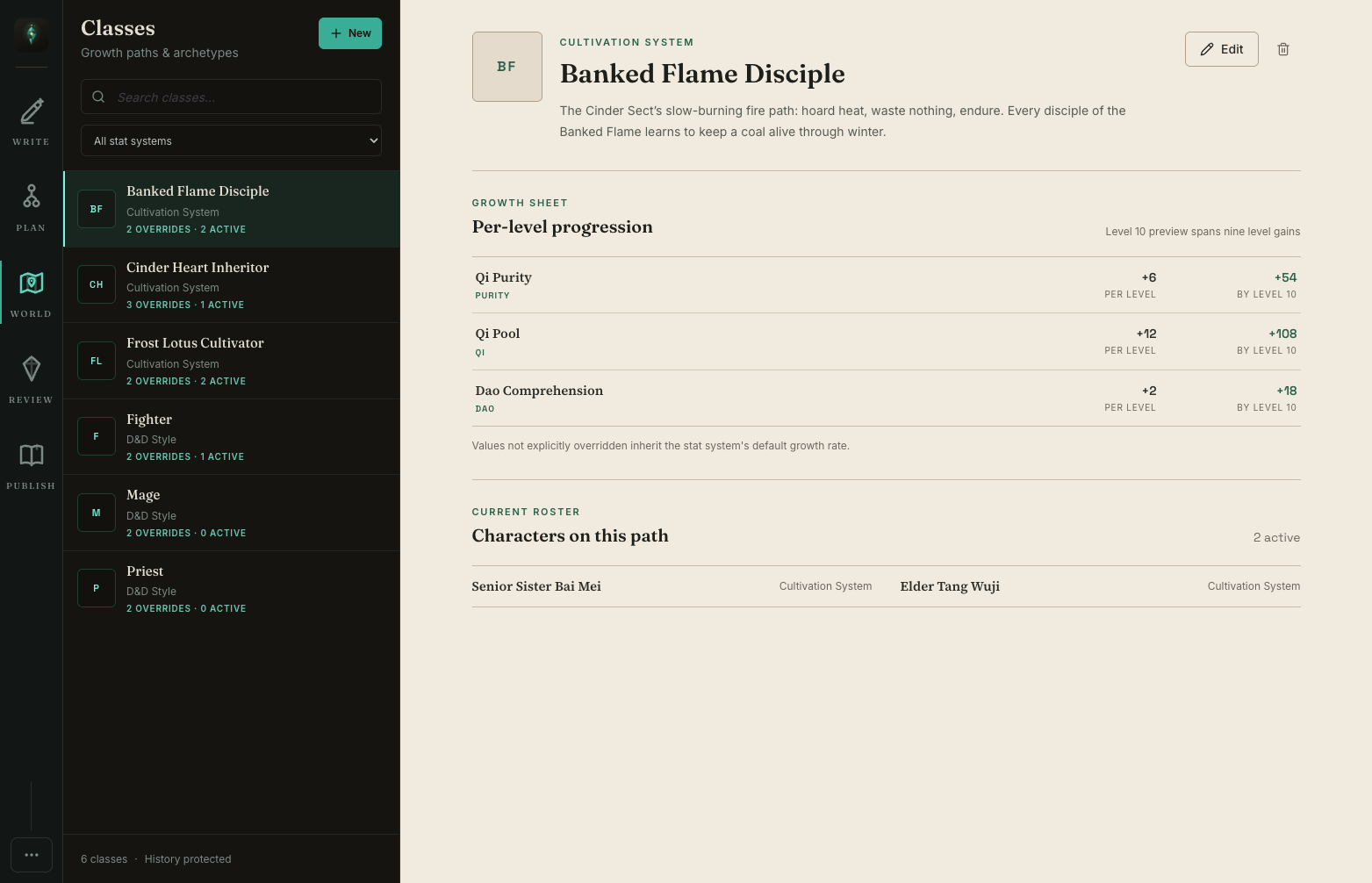
A class change belongs to a scene. WriteIDE can answer both "what class is she now?" and "what class was she when this level-up happened?" The level-up dialog shows the effective rate beside every stat and names where it came from: the class, the base system, or a custom override. The rates you confirm are the rates written to history.
The new Classes workspace puts the class list, per-level growth, level projection, and current members in one place. Built-in systems also have useful starting sets. D&D includes Fighter, Priest, and Mage. Cultivation includes paths such as Sword Dao Cultivator and Alchemist. Tier and skill-based systems have their own options, while custom systems start empty.
A fresh demo project shows the complete arc, including Lin Yuhan's class evolution and a class-driven level-up. Existing demo projects are left alone, so create a fresh one if you want to walk through those scenes.
New: One view for the moving story
Story Overview is the tracker I wanted when the cast stopped fitting in my head. Move one dial through the manuscript and the cast, power curves, factions, and change feed all answer as of the same point in the story. A clearly labeled "Now" rail stays live so current work does not get mixed into the historical view.
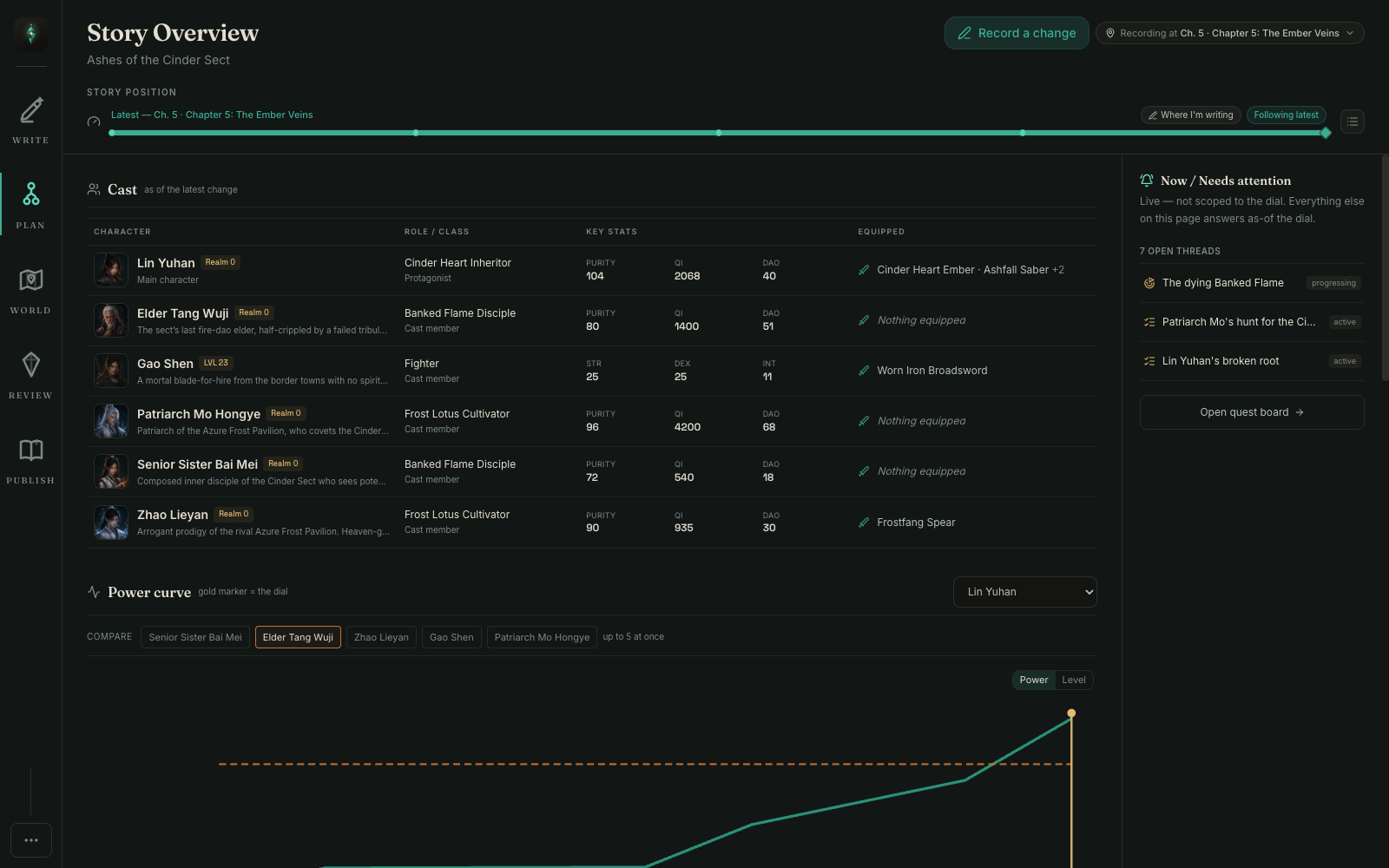
There is also a new start path for writers who already have an editor they like. Choose "Track a story I write elsewhere," import a manuscript or build a chapter skeleton, and keep drafting in Word, Scrivener, or Docs. WriteIDE can sit beside it as the continuity ledger.
From Story Overview, "Record a change" reaches fourteen scene-aware actions. They cover loot and equipment, damage and healing, level-ups and class changes, skills, and the quest lifecycle. A compact chapter picker makes it quick to backfill a change at the right point in the book.
New: Publish a spoiler-safe Reader Codex
Reader Codex turns the world you already track in WriteIDE into a companion site for readers. Choose the latest chapter that is safe to publish, and that chapter becomes a hard wall. Events, reveals, and entities beyond it never enter the generated files.
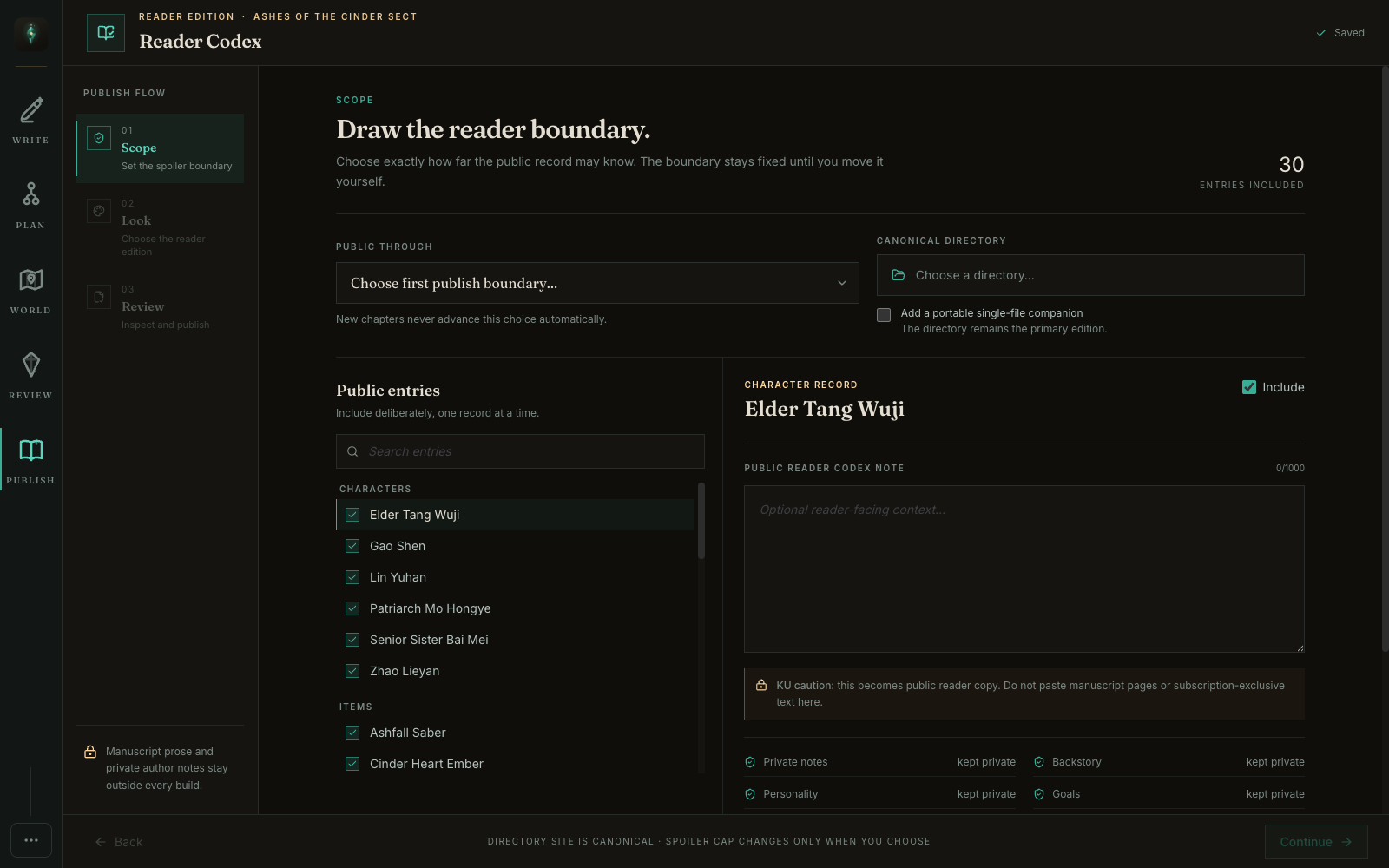
The reader chooses their own position inside that wall. Move from chapter five back to chapter two and every page follows: character stats, classes, inventory, equipment, skills, quests, relationships, faction power, and the Chronicle all fold back to what was true there. The site remembers that position on the reader's device, with no account.
The first release covers characters, items, skills, quests, factions, locations, glossary entries, and the chapter-by-chapter Chronicle. Pages carry real links between related entries, and selected portraits, covers, item art, crests, and location images can travel with the site. You can choose from three themes and publish either a normal folder site with separate URLs or one self-contained HTML file that is easier to attach or share.
Publishing follows three steps: Scope, Look, Review. In Scope, choose the chapter cap, include or exclude individual entries, and add a short public note where it helps. In Look, choose the theme, images, links, and output format. Review builds the actual site inside WriteIDE so you can move the reader-position dial and inspect what every page will show.
The review also produces a spoiler-sweep receipt. It counts what was included and held back and confirms that manuscript prose and private author-note fields are absent. Publish is tied to the exact build you reviewed. If the project or publishing choices change afterward, WriteIDE makes you build and review it again instead of sending stale files. The output is written through a rollback-safe publish step, so an interrupted update does not leave half of the old site mixed with half of the new one.
This is local static publishing. WriteIDE writes the site to a folder on your computer and does not upload it. You can open it directly, zip it for Patreon, or host it wherever you choose. WriteIDE does not provide hosted publishing in 0.6, and no manuscript prose, private notes, cloud database, reader account, or analytics are part of the bundle.
New: Skills with charges and an ending in history
Some skills are blessings with three uses, artifacts that burn out, or techniques a character can invoke once. They should not behave like permanent buttons.
Skills can now have an optional maximum-use count. Record a use from the character sheet or type /skilluse in the editor. Each use belongs to the current scene, so the remaining count is still correct when you inspect an earlier chapter.
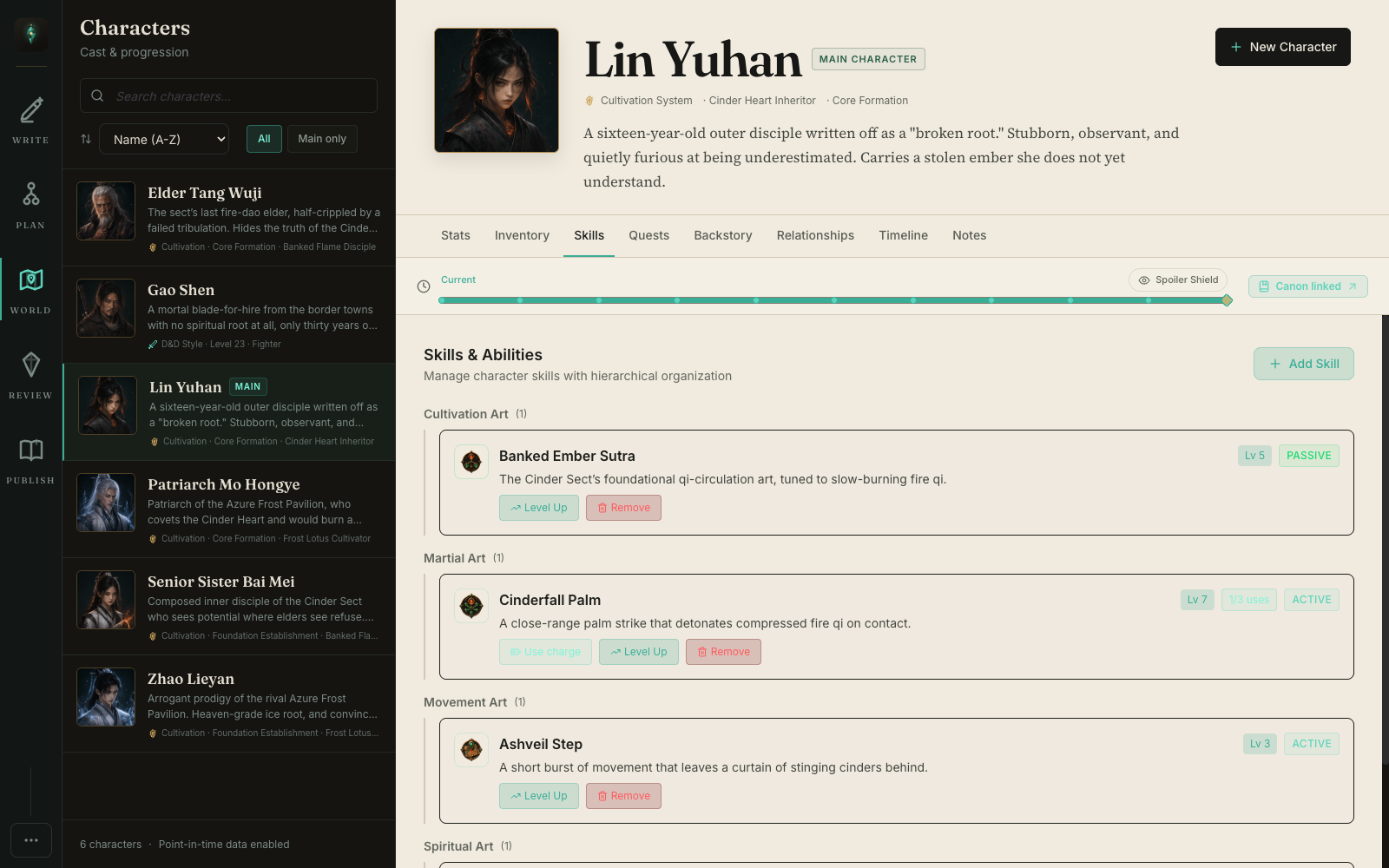
On the final use, WriteIDE keeps the assignment and records "Expended at" with the chapter and scene where it happened. The skill stays in the story's history instead of disappearing.
Improved: Manuscripts export like manuscripts
DOCX output now defaults to US Letter, with A4 available in the export dialog. It includes a standard manuscript header, page numbers, a title page without that header, heading styles that follow the selected font, real hyperlinks, and system-message shading that Microsoft Word renders correctly.
Imported Markdown images no longer disappear. DOCX imports also check the archive before opening it, using a small Apache-licensed routine credited in the app's third-party notices.
New: Twenty free tools on the website
I also pulled a set of small, annoying author jobs out into free browser tools. They do not require the desktop app, an account, or an upload.
The new tools page includes a blue box generator, character stat sheet, author note box, Royal Road table generator and BBCode cleaner. There are calculators for XP curves, damage formulas, character builds, loot tables, reading time, KU pages, and serial release schedules. It also has class, skill, monster, cultivation realm, and pen name generators, plus a rarity palette, scene-break generator, and a plain-language Rising Stars checker.
All twenty run in your browser, and nothing you enter is sent to WriteIDE. The KU and Rising Stars tools use the numbers you give them. They do not log into, scrape, or pretend to know private data from either platform.
Safer recovery and plainer database errors
If WriteIDE finds a project profile created under the older writing-ide application name, it offers to bring that profile forward. The original stays untouched. WriteIDE stages and verifies the import before adopting it, so a failed copy cannot leave the current profile half-replaced.
Database failures are now translated before they reach the screen. You get a short explanation, the safe next step, and the location of the recovery copy when one exists. Raw SQLite messages no longer spill into the interface, and a failed project load no longer looks like an empty library.
Deleting an unused stat template now cleans up the definitions, classes, and analytics it owns in one transaction. If character or story history still refers to that template, WriteIDE refuses the deletion. Cleanup should not rewrite the ledger behind your back.
Long descriptions are allowed to be long
A writer found that character descriptions stopped at 1,000 characters. That limit did not belong there.
The arbitrary caps are gone from character narrative fields and from long-form project, item, skill, version, and quest descriptions. Item lore is uncapped too. Short identity fields such as names, labels, categories, and codes still have sensible limits, but your actual notes and descriptions can hold the detail your story needs. Reader Codex public notes keep their 1,000-character limit because those are short bits of copy written for the exported site, not private story notes.
Windows builds are signed
Windows code signing is finally sorted. The installer and portable build now go through Azure Trusted Signing as part of the release pipeline. That replaces the unsigned builds that showed "Unknown publisher" during installation with a verifiable publisher identity.
Windows can still apply its own security checks, but the file itself is signed and tamper-evident. macOS signing and notarization continue through the existing release process, and Linux builds are unchanged.
WriteIDE remains free, local-first, and account-free. Your manuscript and world data stay on your computer. The app can check for updates and show a release-note image when it is online.
One reader gave me the class system in a sentence. Another asked for limited-use skills. A third caught the description limit. That is how this tool gets better. If WriteIDE makes you work around a rule in your own story, tell me what you were trying to track.
More in Release notes
Saves and backups are safer and visible, words typed just before a crash are offered back, lost projects can be restored from their backups, and long manuscripts import without freezing.
9 min readWriteIDE 0.7.3: every resource pool, clearer History, safer scene changesDamage, healing and Record a change now work with every numeric resource, stat edits land where you are looking, and History and scene deletion explain what they do.
4 min readWriteIDE 0.7.2: safer stats, saved chapters, and a calmer workspacePrepare saved chapters, move typed stats through CSV and Excel, and keep typography and Focus choices with each project.
10 min readNotes worth sending
Release notes when a version ships, plus Lab notes and guides. No weekly filler.