WriteIDE 0.7.2: safer stats, saved chapters, and a calmer workspace
WriteIDE 0.7.2 is now available. Download the 0.7.2 release for macOS, Windows, or Linux.
This release can turn a table of current character stats into a new tracker, export current values to CSV, and move tracked stats and history through a reviewed WriteIDE workbook. It also adds saved chapter preparation and comparison, per-project writing preferences, a closer look at recorded stat changes, book ordering, and safer rarity-set imports alongside your worldbuilding.
The smaller repairs matter, too. Edit Stats has readable headings and help text again, chapter word counts update after saving, and inventory history keeps partial trades straight. The full list of 25 fixes and refinements is at the bottom.
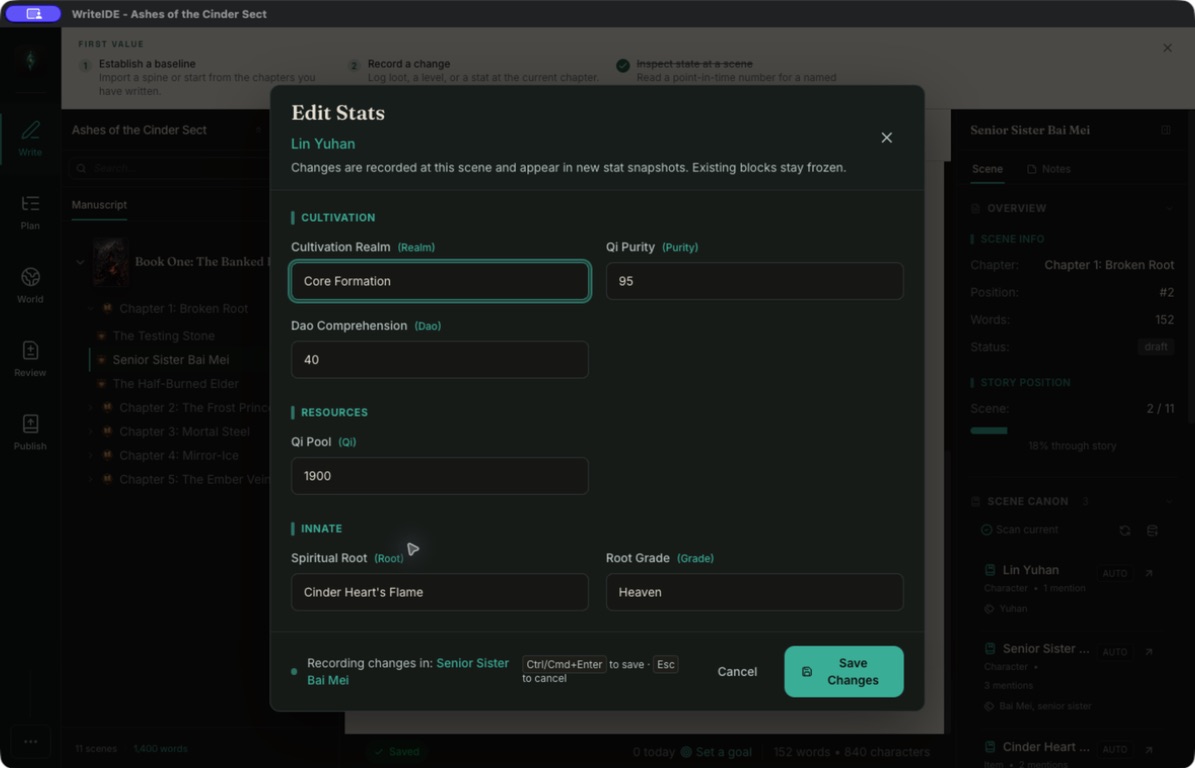
View Edit Stats in dark mode at full size
Give recorded stat changes a closer look
In World → Characters, open a character's Timeline and find Stat history. Use All changes to browse recorded changes in story order, or Needs review to focus on values and decreases that may need a closer look. In Reader views, the list and review count include only history within the selected scene.
These checks cover recorded numeric base changes. They compare values with the stat's current limits, which may have changed since the event; ambiguous stat names are left out of the limit checks. Decrease hints are tentative: a drop can be intentional, so check the recorded reason and story context.
Changes to text, true/false values, and current resource amounts are outside these checks. They do not assess every continuity issue in a manuscript.
Linked history groups now offer Open scene to return to the manuscript. You can also select a point in the progression chart, or choose a Story position, and open its scene.
See what changed in a scene's stat block
The Scenes to review panel now compares recorded numeric, text, tier, and true/false base values at a stat block's stored boundary with values at review time. It shows Different, Unchanged, or Unavailable, with supporting scene links. Inspecting a comparison leaves the alert open; opening the affected scene marks it reviewed. Both sides use the stored scene in the current outline; calculated totals, current resource amounts, and prose are outside this comparison.
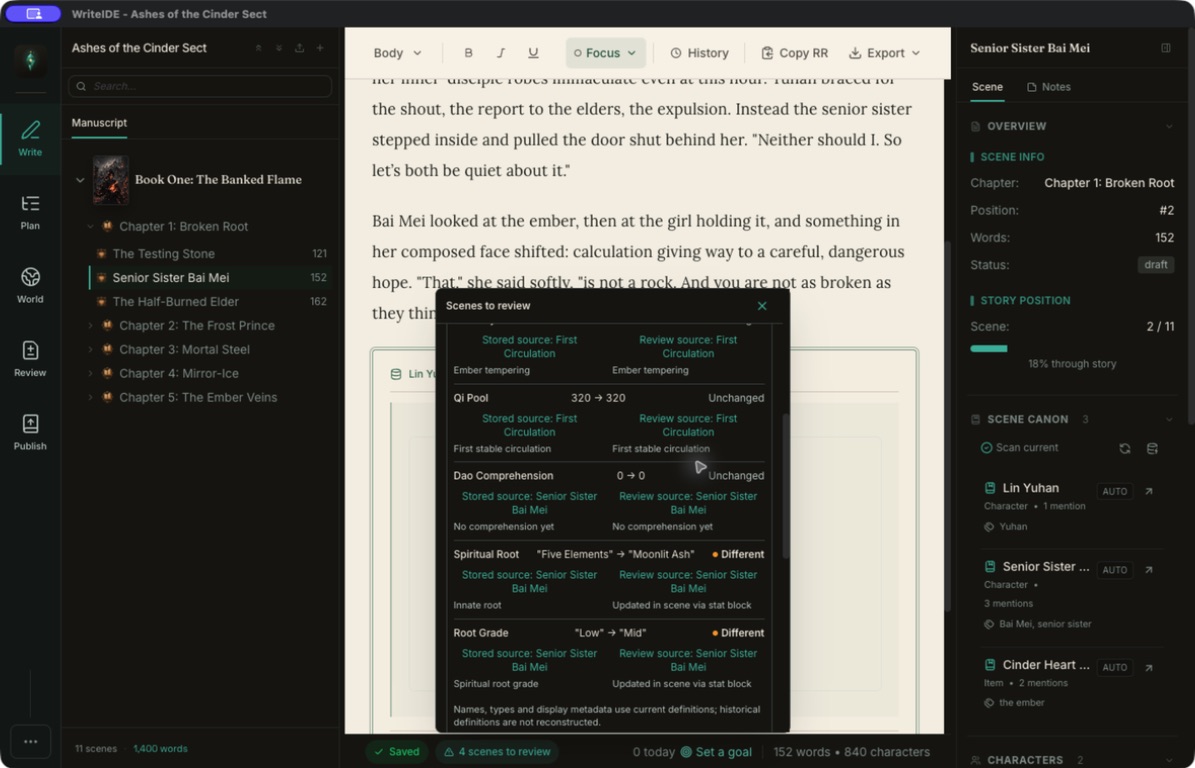
View the stat comparison at full size
Start a tracker from CSV or Excel
In the Project Library, choose New tracker from spreadsheet, name the tracker, and choose a CSV or Excel workbook with one header row and one character per row. Select the character-name column, give each stat a name and type, and skip columns you do not want. The next screen reviews characters and starting values, with a choice to create or skip each row before Create tracker.
Whole numbers, decimals, text, and true/false values are supported. Text such as 00123 keeps its original spelling when mapped as text, and blank stat cells stay unset. Invalid values need correction or an explicit skip. Cancelling before creation leaves no imported characters or stats behind.
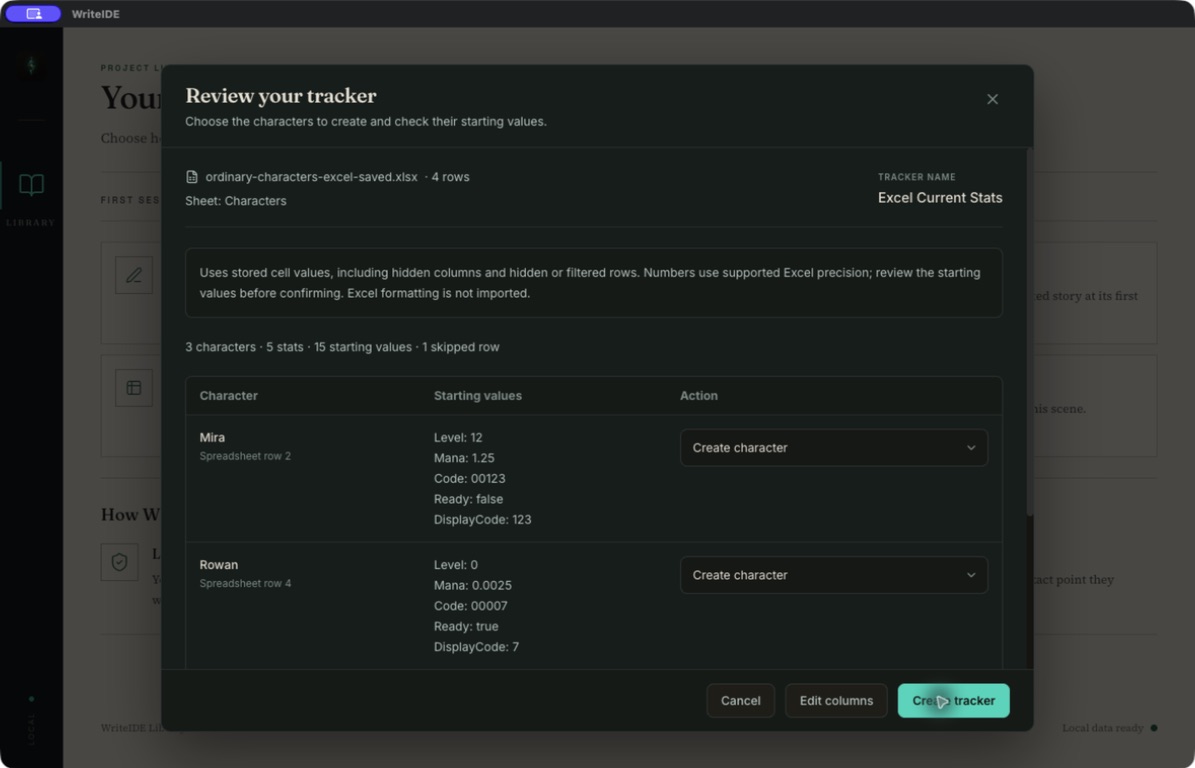
View the spreadsheet review at full size
This flow starts a new tracker from current values. It does not merge an ordinary CSV into an existing project or reconstruct a story timeline. Excel workbooks are supported when they have one populated visible worksheet with headers in row 1; formula cells must be skipped or converted to literal values first. WriteIDE does not execute spreadsheet formulas.
Export current values without a scene
Settings → Export → Export Current Stats CSV writes a readable table even for trackers with no scenes. Text, tiers, true/false values, and resolved calculated values are included; missing values stay blank and unresolved formulas are reported. This is a current-value table, not a history export or a complete project backup. Equipment bonuses, remaining resources, stat definitions, and event history stay in their separate paths.
Preserve a saved chapter
In Version History, choose a saved Version and chapter, then prepare its Markdown. The prepared artifact can be retrieved, copied, or revealed after later draft edits and restart. Ordinary prose, lists, simple tables, self-contained system messages, and saved stat blocks use the captured Version state. Compare the artifact with the current draft to see whether the Markdown still matches and inspect highlighted wording changes.
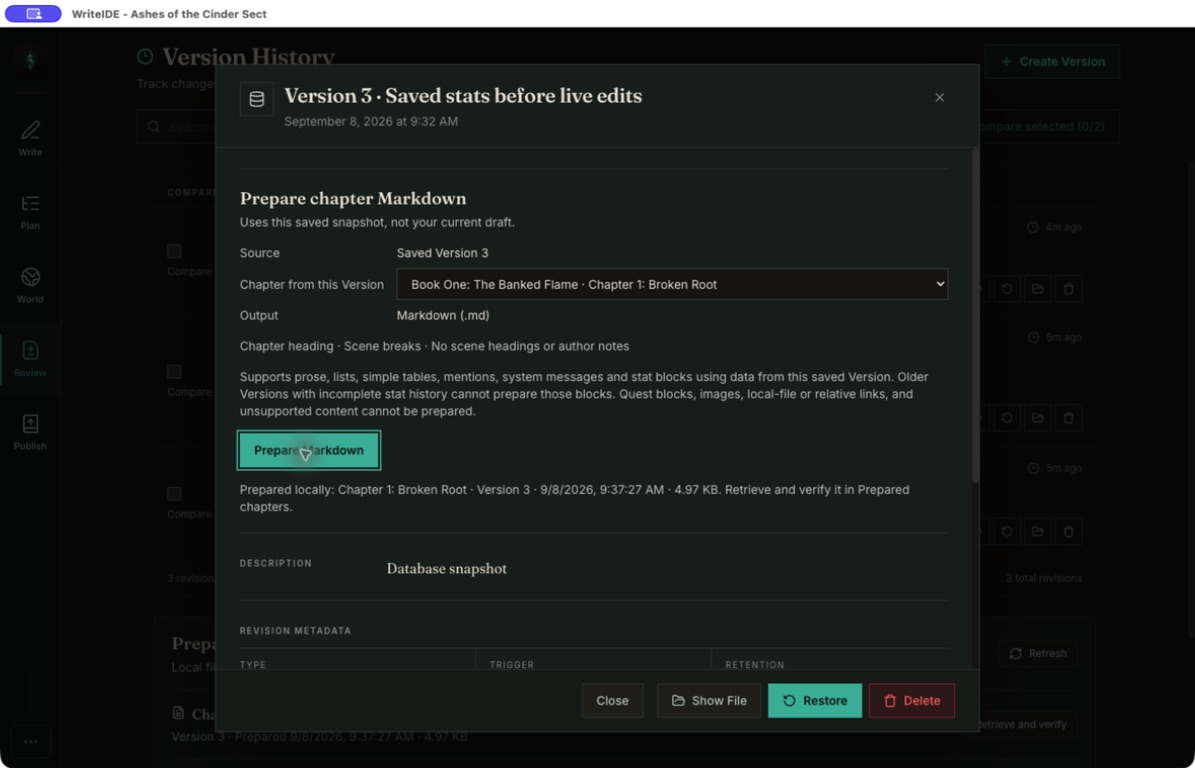
View chapter preparation at full size
Prepared chapters are stored on this computer and are not carried by ordinary project backups. The recovery bundle contains private project data; share only the chapter Markdown. Linked quests, images, protected Office content, local links, and other unsupported content are refused explicitly. Portable adoption and destination rendering remain separate limitations.
Review a WriteIDE stat import
With a project open, choose Settings → Export → Import Character Stats and select a WriteIDE stat workbook, or a CSV that follows WriteIDE's current-stats or history format. The confirmation shows the proposed characters, attributes, story positions, and stat changes before you import.
Imports into an existing project continue to require the WriteIDE format. The Project Library's new-tracker entry also accepts WriteIDE stat workbooks and declared stats/history CSV files through their existing review flow.
Take tracked stats back to a spreadsheet
Settings → Export → Export Character Stats writes a canonical workbook from the stats and history WriteIDE already tracks. Reimporting that unchanged workbook into the same project is a no-op: it does not duplicate the recorded characters or events.
If an interrupted export leaves a partial file, the next attempt shows its exact location. You can reveal and preserve the file, then retry after moving or removing it. WriteIDE does not silently replace it.
Rarity belongs with the world
Project rarity tiers now live at World → Rarity Sets. Open Manage Rarity Tiers to edit tier names and colors. Under Share set, use Export or Import to transfer a WriteIDE rarity-set JSON file between projects.
Import still merges by name: matching tiers update, new tiers are added, and no tiers are deleted. The JSON import now completes as one change: if any tier cannot be saved, the project keeps its existing set. Successful imports preserve existing item references, local icons, and unmatched tiers.
Ambiguous existing tier names must be renamed before importing. An empty description in the imported file clears the matching tier's old description. A reusable library of named rarity templates remains future work.
Focus on a whole chapter
Focus Mode now works in Scrivenings, where you write a chapter's scenes together. Use the existing Writing focus options menu, Cmd/Ctrl+Shift+F, or Toggle Focus Mode in the command palette to hide surrounding workspace controls while keeping the manuscript available.
Selecting the chapter you are already writing preserves Focus and your text selection. Escape dismisses an open command palette before leaving Focus; switching scenes or chapters keeps that project's Focus preference. Typography and optional typewriter centering are also remembered per project on this computer, without changing exported formatting.
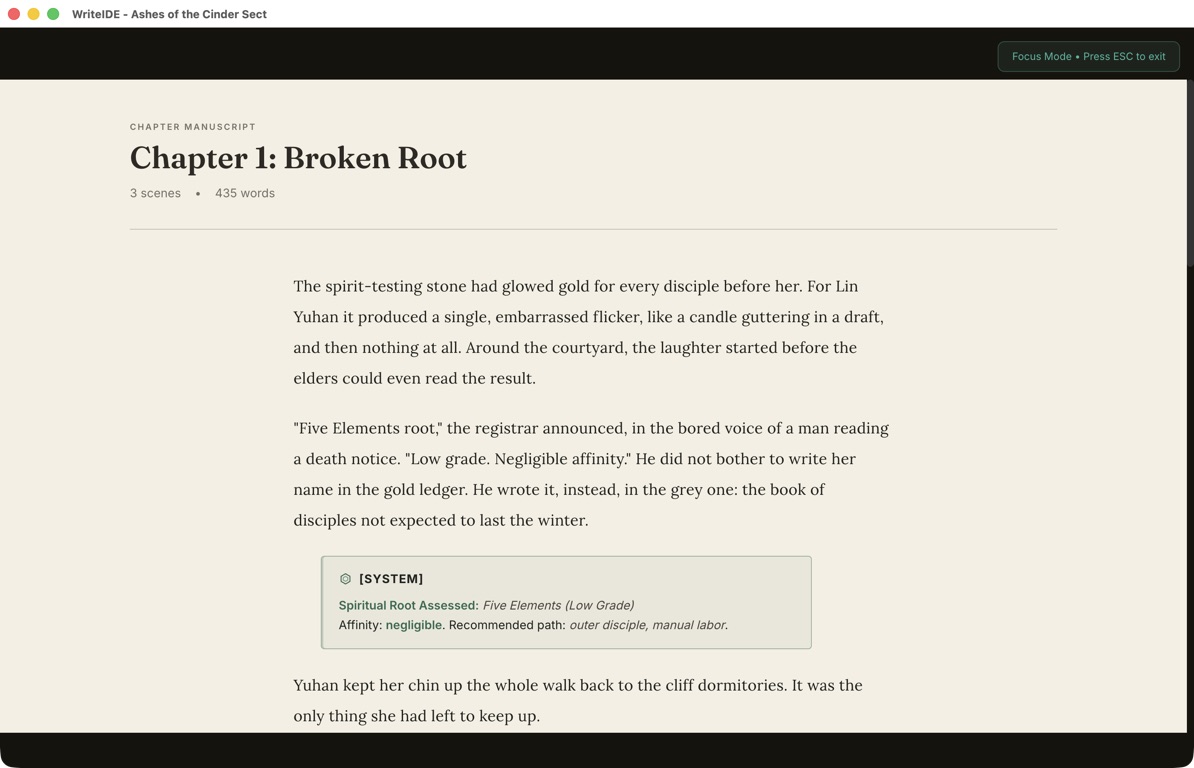
View chapter Focus Mode at full size
Clearer workspace navigation
Write, Plan, World, Review, and Publish keep their existing roles. Their sidebar controls now use one consistent family of line icons and more readable labels. The active workspace has a quiet jade marker, and keyboard navigation remains in place.
The right class in custom HTML
In 0.7.1, the custom HTML {{class}} placeholder could print an internal stat-system identifier. The correction uses the character's class at the stat block's recorded story position and time. Moving the block later in the manuscript does not silently replace its earlier class with a newer one. An unassigned or removed class renders empty.
This correction applies to custom HTML templates. Other export formats keep their existing rendering.
Character summaries keep their typed values
Tier names, text values, and Yes/No stats now display correctly in Story Overview and character hovercards. A Realm such as “Core Formation” keeps its name instead of appearing as 0. Numeric totals and resource bars keep their existing behavior.
A tracker without scenes shows its current stats in Story Overview. Character cards recognize an imported Level column and show the recorded value, including zero; they no longer invent Level 1 when no progression stat exists. Once the story dial selects a scene, summaries continue to use that scene's historical values.
Organize the story and review the surface
Move books earlier or later from the manuscript menu while keeping the selected scene open; scene-specific stats and recent changes follow the new story order. The paper editor, stat previews, code, and related dialogs retain readable contrast in both themes, while backup status keeps snapshot, manuscript, and portable-package outcomes distinct.
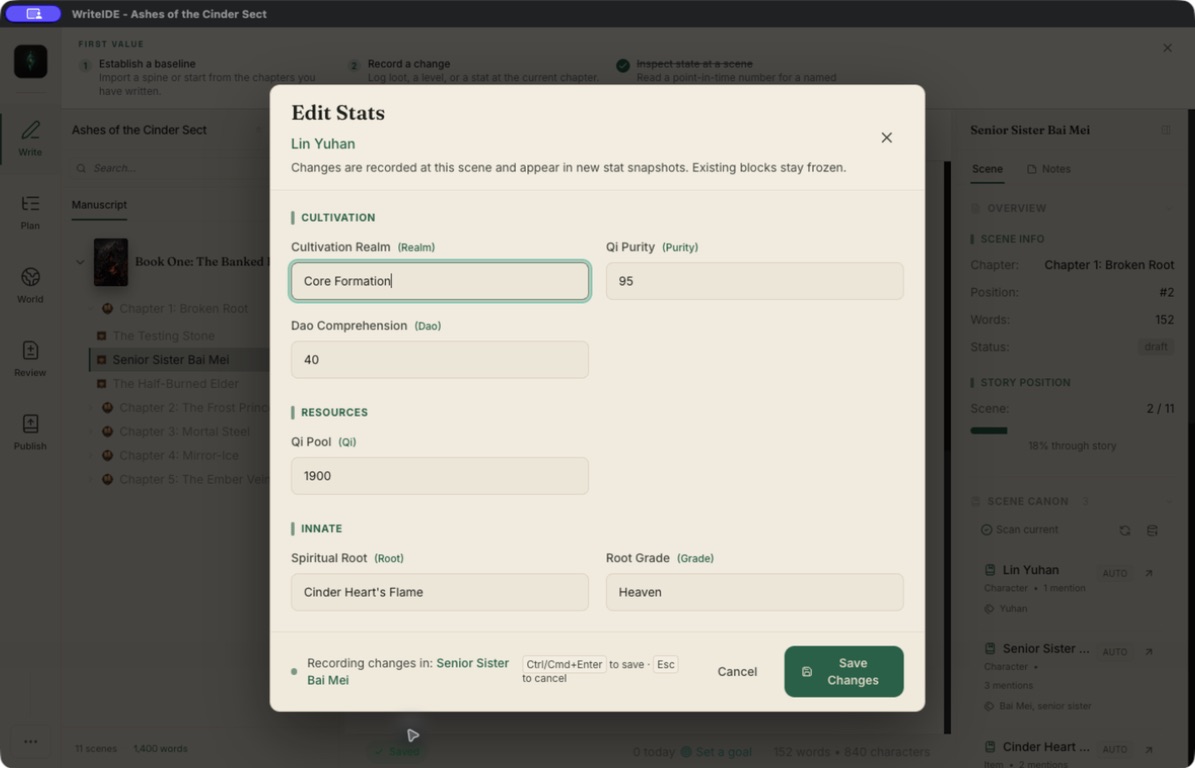
View Edit Stats in light mode at full size
What stays separate
Linked DOCX write-back and returned-PDF annotation review remain disabled while their own fidelity and acceptance work continues. The existing manuscript import and export paths remain available.
Fixes and refinements
Here are the smaller changes included in 0.7.2, alongside the features above.
Writing and getting started
- The demo gets its own walkthrough. A newly created demo no longer inherits another project's first-session checklist. Existing progress is preserved.
- Writing guidance recognizes writing. Saving prose in scene or chapter view completes the blank-writing step; characters and stats remain optional. Help explains reopening a draft and using Version History.
- Creating a manuscript avoids duplicates. Only one creation can be pending. Failed creation keeps the form available; a project that was saved but could not open can be retried from its library card.
- Demo prose no longer counts toward today's goal. Loading the example manuscript keeps its saved versions without claiming those words as your writing. Later edits still count.
- Chapter word counts refresh on save. Scene, chapter, and project totals update after saving a whole chapter while preserving prose, selection, and undo behavior.
- A pending paste stays with its manuscript. Switching projects before a chapter paste finishes no longer sends the save to the newly opened project.
- Short imports reach manuscript review. Usable single-chapter and headingless manuscripts no longer lead to an empty chapter skeleton. The optional skeleton path and cancellation cleanup remain available.
Stats, characters, and worldbuilding
- Canon shows Yes/No facts correctly, including stored and older boolean values.
- Current equipment changes preserve earlier history. Equipping or unequipping from Current inventory records the change at the latest story scene; commands can still target an explicit scene.
- Partial transfers keep each holder's quantities. Historical Item History dialogs retain their scene limit and read-only behavior, label catalog details as current, and show unknown quantities explicitly when records are incomplete.
- Each trade appears once in Item History, with both character names and the transferred quantity. Separate trades remain separate events.
- Trade selections keep item names visible beside a compact quantity field. Item History text and notes remain readable in paper dossiers and themed dialogs.
- History review preserves story order and typed text, including
00123. Current resource changes stay separate from base-stat checks, and recovery is not compared with a historical maximum. - Character summaries preserve text, tiers, and Yes/No values. Story Overview and hovercards no longer substitute a numeric placeholder for values such as “Core Formation.”
- Trackers without scenes show current stats. Character cards recognize imported Level values, including zero, and no longer invent Level 1 when no progression stat exists. Selected scenes still show historical values.
- Imported characters without a named stat template display Custom, while keeping their stat values and Canon links.
- Rarity presets preserve item assignments. Applying a preset remaps items from their current rarity; if replacement fails, the previous tiers and assignments remain intact.
- Rarity-set imports complete together or leave the project unchanged. Existing item references and unmatched tiers are preserved. Ambiguous names must be resolved first, and an empty imported description clears the old description.
- Custom HTML uses the recorded class name. The
{{class}}placeholder respects the stat block's story point and time instead of printing an internal identifier. Unassigned or removed classes render empty.
Imports, exports, and backups
- Excel's longer numeric notation imports correctly for supported numbers, with formula and unsafe-number checks retained.
- Backup results stay distinct. A successful manuscript or portable-package export cannot hide a failed snapshot. Pending backups retain their original project, and snapshot file time is labeled separately from a restore check.
- Interrupted spreadsheet exports explain the partial file. The retry message identifies its location and lets you reveal and preserve it before moving or removing it to try again.
Readability and navigation
- Paper stat previews and code keep readable ink in both themes. Provenance no longer covers modal controls, focused preset placeholders stay visible, and indented or long wrapped code remains readable.
- Edit Stats and related dialogs follow the theme. Headings, explanations, validation, and shortcuts remain readable after inserting a Field List block. The save hint names Ctrl/Cmd+Enter; system-message controls, selected-field counts, and preset Save labels use theme-aware colors.
- The sidebar uses consistent icons and clearer labels for Write, Plan, World, Review, and Publish, preserving their order and keyboard navigation.
WriteIDE remains free, local-first, and account-free. Download 0.7.2, or use Check for Updates in the app.
More in Release notes
Saves and backups are safer and visible, words typed just before a crash are offered back, lost projects can be restored from their backups, and long manuscripts import without freezing.
9 min readWriteIDE 0.7.3: every resource pool, clearer History, safer scene changesDamage, healing and Record a change now work with every numeric resource, stat edits land where you are looking, and History and scene deletion explain what they do.
4 min readWriteIDE 0.7.1: your HTML, your chapter, your cardsWriteIDE 0.7.1 adds HTML publishing templates, Royal Road copy, share cards, and feedback fixes. Available for macOS, Windows, and Linux.
3 min readNotes worth sending
Release notes when a version ships, plus Lab notes and guides. No weekly filler.