9 Ways to Show a Status Screen in a LitRPG Chapter
Show a status screen when a number changes a decision or marks a milestone, and use the smallest form that does the job. That can be a sentence of prose, a one-line notice, a short list of what changed, or a full character sheet shown once. This post covers nine forms, in rough order from lightest to heaviest, with an example of each and a note on when it earns its place.
Every example below is real output: we typed text we wrote for this post into our free Royal Road Blue Box Generator, Character Sheet Generator or Royal Road Table Generator and captured the preview. Nothing is quoted from a published book. The examples all describe one invented hero, Ilsa Marrow, at level 2, using the rules from our LitRPG how-to guide, where Max HP is Vitality × 10 + Level × 5. That is deliberate: the numbers agree from box to box, and that agreement is the thing to protect.
Disclosure and scope. WriteIDE makes the tools shown here and the free WriteIDE desktop app. Which form fits when is our craft opinion, not a rule, and no reader data stands behind it. The pictures are the tool previews: Royal Road adds its own thin table border on the published page, so check the platform preview before you publish.
The nine ways at a glance
| # | Way | Best for | Size | Watch for |
|---|---|---|---|---|
| 1 | A sentence of prose | A small change that needs no box | One sentence | Readers may want the exact number |
| 2 | A one-line notice | A single event, such as a stat gain | One line | Becoming a tic if every action gets one |
| 3 | A compact status line | Orienting the reader at the start of a fight | One line | Stale values if you forget to update it |
| 4 | A level-up box with only what changed | A milestone | 2 to 6 lines | Listing everything instead of the change |
| 5 | A skill or ability card | A new power | 3 to 6 lines | Rules text that hides the scene |
| 6 | A quest or objective box | A goal the reader should track | 3 to 6 lines | Numbers that drift between updates |
| 7 | A gear or inventory table | A loot haul or a trade | 3 to 10 rows | Color-only rarity |
| 8 | A full character sheet, shown once | Introducing a character, or an arc break | 10 to 20 lines | Repeating it every chapter |
| 9 | A sheet with hidden fields | Something the hero cannot see yet | 3 to 6 lines | Hiding things you later contradict |
Which ways keep the page light?
1. A sentence of prose
Use it when a number changed but the moment is about the character, not the system. A status box is a pause in the story; a sentence is not.
The second level-up hit like a held breath let go. Vitality was ten now, up from eight, and her health with it: a hundred and ten, up from eighty-five.
Watch for. Prose is easy to read and easy to get wrong. If you write the number, it has to agree with every box that shows it, so treat each number in the sentence as a promise.
2. A one-line notice
Use it when one thing happened and the reader should register it without stopping.

This is the Blue Box Generator with the System (blue) preset, no title and a single body line.
Watch for. A notice for every small action turns the system into noise. Save it for gains the story cares about.
3. A compact status line
Use it when a scene begins and the reader needs the stakes in one glance, such as at the start of a fight.

Watch for. A status line is a snapshot, so it goes stale the moment HP changes. If it appears more than once in a scene, decide whether each repeat shows the current value, and keep to that.
Which ways mark a change or a milestone?
4. A level-up box with only what changed
Use it when the character reaches a milestone. List what changed, with the before and after, rather than the whole sheet.
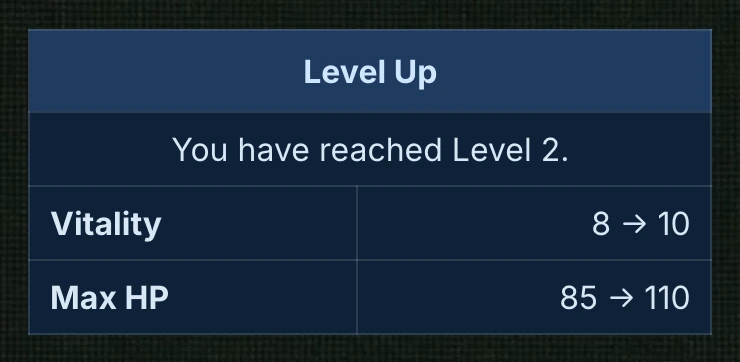
The arithmetic is checkable: Vitality 10 × 10 + Level 2 × 5 = 110. The reader sees the change and what it cost or bought without a table of everything else.
Watch for. Every row should be a change. If a row has the same value before and after, remove it.
5. A skill or ability card
Use it when the character gains a power the reader needs to understand, and the story is about to use it.
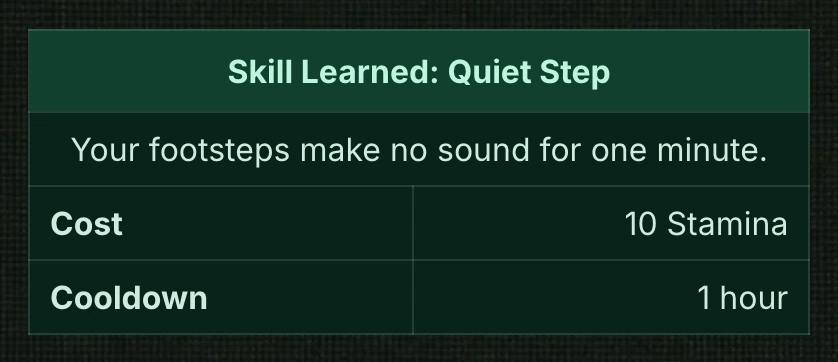
Watch for. State only what the next scene needs. A card that lists every edge case teaches rules instead of telling a story, and each rule you print is one you must keep.
6. A quest or objective box
Use it when the character takes on a goal that will span scenes.
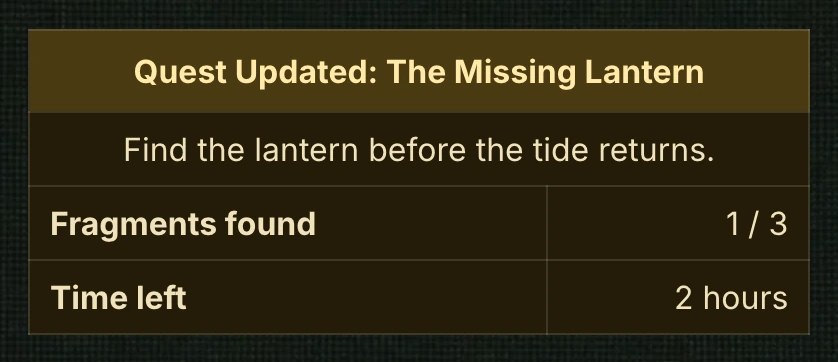
This used the Quest (gold) preset of the Blue Box Generator. For a fuller panel with objectives, rewards and prerequisites, the free LitRPG Quest Builder builds one and checks for missing pieces.
Watch for. A quest box is a running count. When it appears again, the count has to match what happened in between.
Which ways show a lot at once?
7. A gear or inventory table
Use it when the character gains or trades several items and the reader will care later which ones they hold.
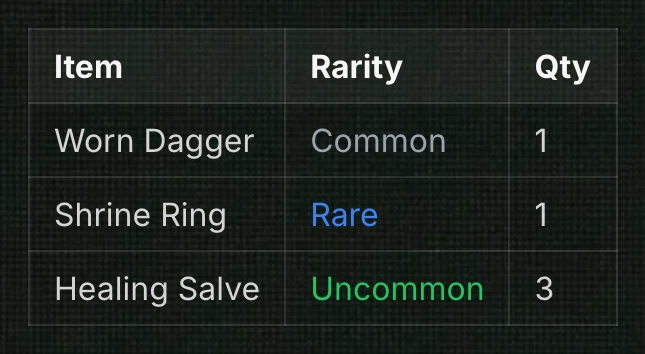
Rarity appears as a word as well as a color, which matters because color can be lost or hard to see. Both the Table Generator and the Character Sheet Generator keep the tier name in the text for that reason.
Watch for. Long tables on a phone. Keep it to the items that matter, and check the chapter at a narrow width before you publish.
8. A full character sheet, shown once
Use it when you introduce a character, or when an arc changes the whole picture. Show the sheet once, then use smaller forms for changes.
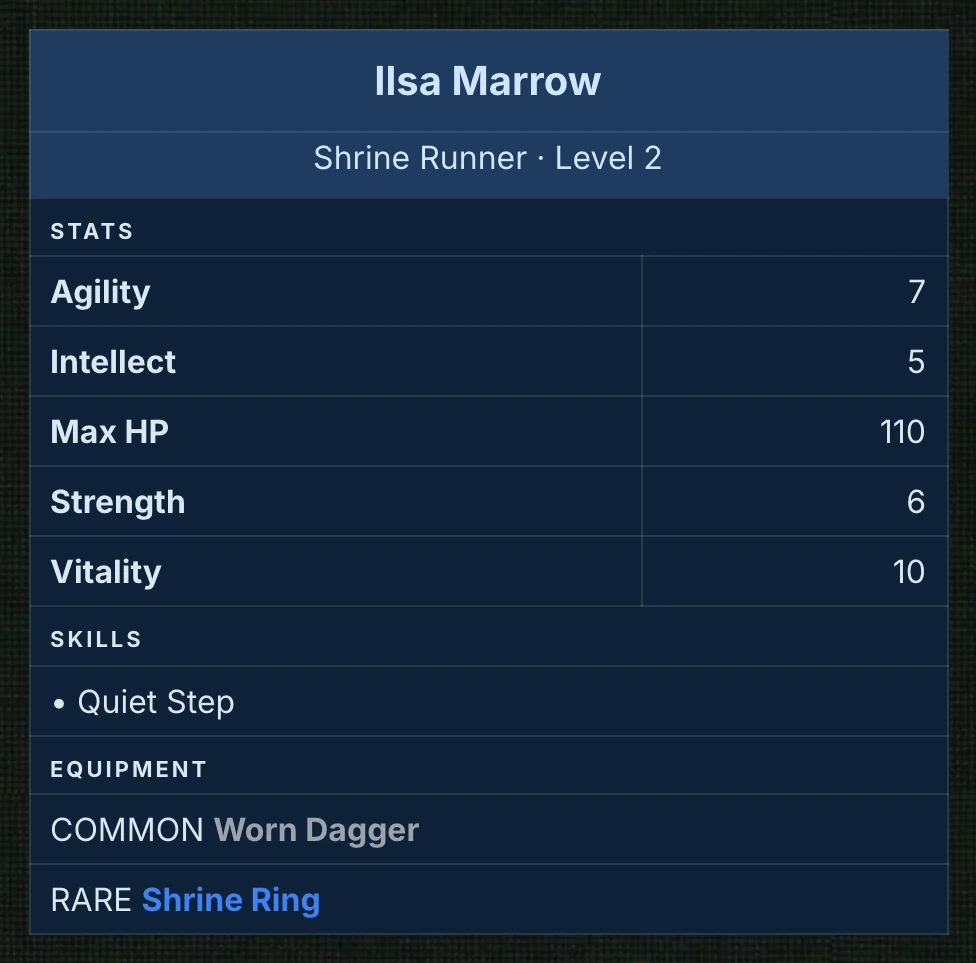
The generator lists the stat rows in its own order, so the sheet reads the same however you type them. It formats what you enter and does not track how a sheet changes over the book.
Watch for. A full sheet after every fight buries the story. In our judgment, a full sheet works best at a handful of fixed points in a book, so the reader learns to read it as an event.
Can a status screen hide information?
9. A sheet with hidden fields
Use it when the hero cannot know something yet, such as an unknown creature's level.
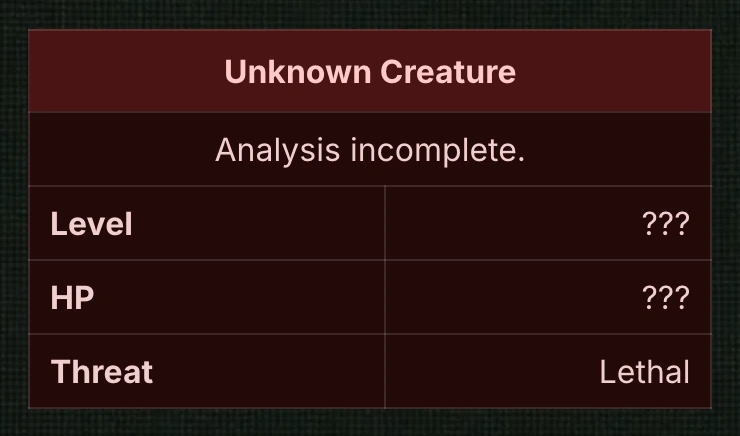
Watch for. A hidden value is a promise. When the field is revealed later, it must be a number your system could have produced, and the earlier box must not contradict it. Keep the true value in your notes from the start.
How do I choose between them?
Ask what the reader needs at that moment:
- A feeling, not a figure: use prose (1).
- A single event: use a notice (2).
- The stakes before a scene: use a status line (3).
- A milestone: show what changed (4), plus a skill card (5) if a power unlocked.
- A goal to track: use a quest box (6).
- A haul of items: use a table (7).
- A first look at a character, or a reset: use a full sheet (8).
- A mystery: hide the field (9).
If two forms seem right, pick the lighter one. You can always add a box in revision, but removing a number readers have already seen means checking every later chapter.
How should a status screen be formatted so it survives the platform?
- Make it readable without color. Put the result in words, as the example boxes do.
- Keep one idea per line. Short lines wrap cleanly on a phone.
- Check the platform preview. Royal Road's own table styling can differ slightly from a generator preview.
- Have a plain-text fallback. If the markup is stripped, the text should still make sense.
For the mechanics of building a box and placing it in a Royal Road chapter, see our step-by-step blue box guide. For the opposite problem, a system that takes over the page, see 10 LitRPG system design mistakes.
How do I keep the numbers on every screen consistent?
Each box above states a number, and each is a promise about the story at that point. The level-up box, the status line and the sheet all agree here because they come from one rule, and the quest and hidden-field boxes stand on their own. Across a whole book the same discipline needs a log. Our guide to keeping LitRPG stats consistent across a series shows a ledger, the free LitRPG Stat Tracker logs changes by chapter and shows every stat as it stood at any chapter, and the Stat Block Continuity Checker compares two status windows and highlights what changed.
Where does a writing app fit?
Typing each box into a generator and pasting it works for a short book. It gets harder when every box must be kept in step by hand through revisions. WriteIDE is a free desktop writing studio for LitRPG and progression-fantasy authors. As of version 0.7.5 you can type /bluebox to insert an editable system message in a scene, /statblock to insert a stat block that shows a character's values at a chosen point in the story, and /questblock for a quest display. Stat blocks come in several display styles, and you choose which fields appear.
After an earlier correction, a Scenes to review list shows the stat blocks it may have made out of date. Copy for Royal Road and Copy for Patreon prepare a chapter for those sites, and the Patreon copy keeps stat blocks readable without tables; nothing is posted for you. WriteIDE runs on macOS, Windows and Linux, stores your project on your computer, and requires no account. It does not write your prose.
Frequently asked questions
What is a status screen in a LitRPG?
A status screen, also called a status window or stat block, is a short display of a character's numbers and abilities inside the story, usually set apart from the narration as a box or table. It shows the reader the game rules the character is living under.
How often should a LitRPG show a status screen?
There is no rule. We suggest showing one when a number changes a decision or marks a milestone, and summarizing otherwise. If you cannot say what the reader learns from a screen, cut it or shrink it.
How do I format a status screen for Royal Road?
The free Blue Box Generator builds a small HTML table with inline styles that you paste into Royal Road's source-code view. Our formatting guide walks through placing it and checking the platform preview before you publish.
Should a status screen use color?
Color helps, but do not rely on it alone. State the important result in words so the chapter still reads if color is lost, and check how the chapter looks on a phone.
Do I need software to make a status screen?
No. A table in any editor, or a generator that outputs HTML, is enough for a light system. A writing app helps most when the screens must stay in step with a stat log across many chapters.
Written for WriteIDE 0.7.5, October 2026. The hero, rules and numbers above are invented illustrative examples, and the advice is craft opinion.
More in Publishing
Ten common ways a LitRPG system goes wrong, from free level-ups to dead stats, with a hand-checkable example and a fix for each.
11 min readHow to Write a LitRPG: 8 Steps From System Rules to Finished ChapterA step-by-step guide to writing a LitRPG: decide how much game your story needs, write a one-page rulebook, plot around progression, show the system, and keep the numbers consistent.
9 min read12 Free Tools for LitRPG Authors, and When Each One Is Worth UsingTwelve free, no-account browser tools for LitRPG authors: stat tracking, XP curves, damage formulas, loot odds, Royal Road formatting and serial planning, each with its limits.
9 min readNotes worth sending
Release notes when a version ships, plus Lab notes and guides. No weekly filler.