Paper, ink, and four weeks of trying to lose a book: WriteIDE 0.7.8
It is Thursday night and you post on Fridays. Chapter 81 is two-thirds written, the fight is finally going the way you wanted, and the laptop dies with the lid half shut.
What happens next is the whole job of a writing tool. Stat tracking, exports and good type are all worth nothing if the answer to "is my chapter still there?" is anything but yes.
For four weeks I asked that question of WriteIDE in every place I could think of: in a crash, in an import, in a backup, in an export, at the Delete key. I found more than I wanted to, and some of it was in the safety nets themselves.
This is WriteIDE 0.7.8, the first stable release since 0.7.5 in October. (0.7.6 and 0.7.7 never shipped. That story is further down.) It holds 227 changes. Underneath, it moves from Electron 42 to Electron 45 and makes six small additions to how your library is stored. Counting only the app's own code, I removed slightly more than I wrote: about 65,000 lines in, about 66,000 out. I am prouder of the second number.
It is also the release where WriteIDE stopped looking like every other app and started looking like a writing desk. I will get to that. The words come first.
Music: "Inspired" Kevin MacLeod (incompetech.com)
Licensed under Creative Commons: By Attribution 4.0
https://creativecommons.org/licenses/by/4.0/
The moment after the crash
Before this release, the words you typed just before a crash or a force-quit could be gone. If the app went down a second time, it could throw away recovered words you had not yet decided about. The card offering your text back could sit thousands of pixels off-screen while the status bar said Saved. And Chapter View had no recovery at all: a force-quit there cost up to about a second and a half of typing.
A second and a half is the end of a sentence, and it is always the sentence you liked.
Now your typing reaches the recovery journal within one frame of the screen. Chapter View has a journal of its own. A second crash leaves the first rescue alone, the offer appears where you can see it, and a recovery copy is kept unless the whole scene is already saved.
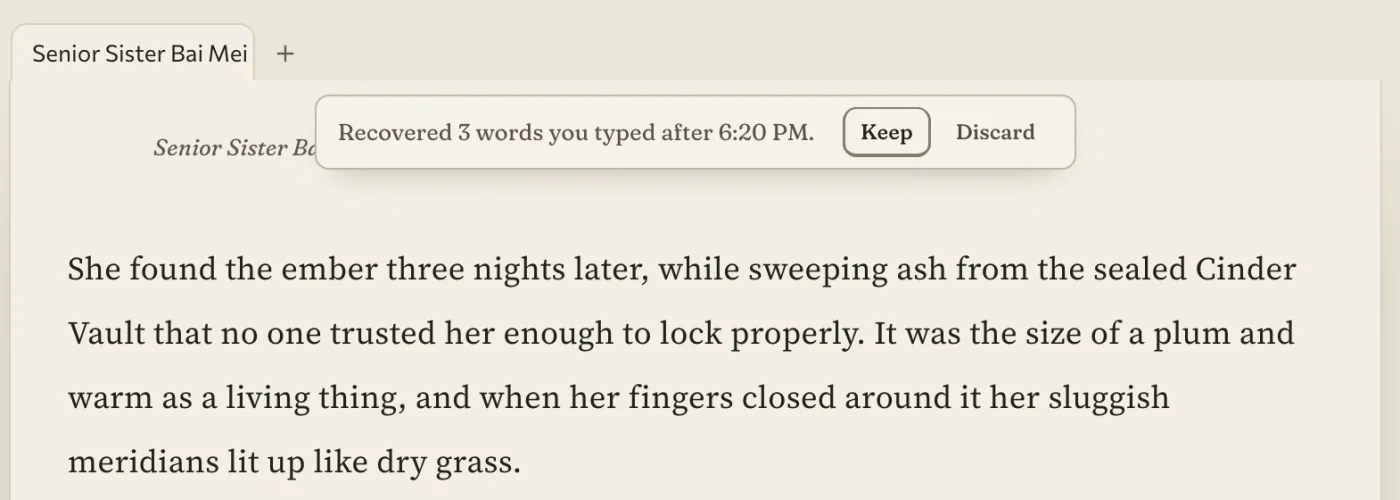
For your next chapter: if the lid closes at the wrong moment, open the scene again. The words you had not saved are waiting for you to keep.
A book that comes in whole
Most of you will not start in WriteIDE. You will arrive with forty chapters in Word or Google Docs. So import has one rule: every word comes in, or the import says which words did not.
It was breaking that rule quietly. It dropped everything before the first chapter marker. It dropped any paragraph that happened to begin with "Part 2" or "Prologue". One-cell boxes, which is what a status box usually is in Word, were flattened into plain lines. A 26-chapter book came in as three chapters. Pictures were not stored.
All of it is fixed. Opening Part and Act headings, boxes, pictures and list numbering survive. Simple tables from Word and Google Docs arrive as real tables. Plain chapter lines, such as a bare "7", are offered in the import review, and so are splits for very long scenes. When something cannot be carried, the import names the words it left out.
For your next chapter: bring the whole book, prologue included.
A backup that actually restores
This is the part I am least proud of. A backup you cannot restore is only a comfort, and I found four ways mine could let you down quietly:
- A Markdown import whose pictures lived in an
imagesfolder switched backups off for that project. Every later backup failed, and the error was easy to miss. - On a Mac, closing the window and reopening it from the Dock stopped automatic backups, and update notices, until you quit the app.
- A restore that succeeded could then delete the pictures it had just restored.
- The plain-text safety copy inside a milestone backup came out with stripped punctuation and marker debris.
Each is fixed. Backups now also carry pictures that only deleted scenes use, and on Mac and Linux your automatic backups are readable by your own account only.
There is still no sync, and I will not dress a shared folder up as one. What Settings has now is Copy my library to a folder, which makes a fresh full backup of every project and reads each copy back before it counts, and Bring in from a folder for the other machine. If the library is already open somewhere else, WriteIDE tells you which computer before it touches the file.
For your next chapter: the backup made tonight carries your pictures, and a restore keeps them.
Delete is no longer forever
Deleting a scene used to warn you that it could not be undone, and then destroy it. Both halves were wrong. A warning you see every week trains you to click through it, and the destruction lands on the one day you clicked wrong.
Now deleting a scene, chapter or book asks nothing and destroys nothing. It moves to a Deleted shelf at the foot of the chapter list, with an Undo beside it. Put back returns it to its place with its recorded changes reattached. Remove for good is the only permanent step, and it asks first. Versions can put back a scene, a chapter or a whole book too, and saves a "Before put-back" version first, so even the undo can be undone.
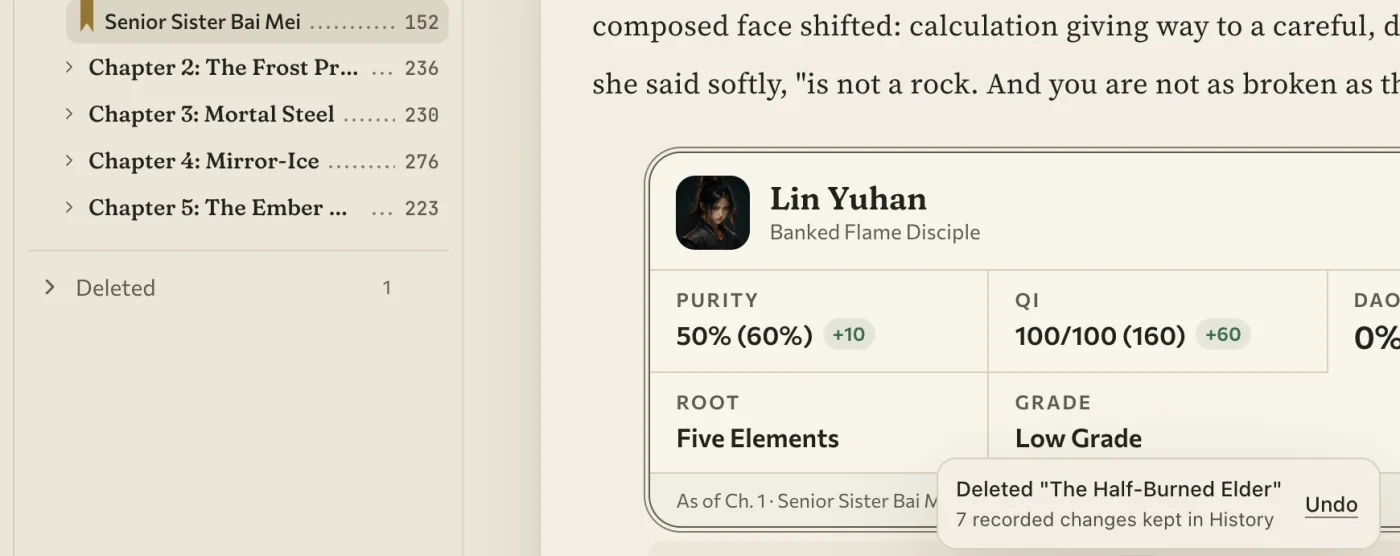
Exports that tell the truth
An export has the same duty as a save: say what really happened. Before, an export could report success with an error message sitting where a scene should have been. Now, if a scene fails to convert, the export stops and says so.
Word exports keep your embedded pictures, at their own proportions instead of one forced box. A picture that cannot be read is skipped with a plain notice, and the rest of the book still exports.
EPUB keeps emoji and rare characters, keeps the prose that follows a code block, and no longer invents chapters. PDF carries its own fonts for Cyrillic, Greek and Central European text, and for the symbols a status screen leans on: arrows, stars, check marks, ≥, ≤, ≠, ∞, √. Before that, the Russian word Привет came out of a PDF as Aô@C„2CTB. A character no bundled font covers now prints as a visible placeholder, and the export warns you.
For your next chapter: the file you hand a beta reader holds what you wrote. When it cannot, you hear about it first.
Paper on a dark desk
Now the part you will notice before you read any of this.
WriteIDE used to look like software: an icon rail down the left, a coloured pill that said Saved, parts borrowed from everywhere. None of it was wrong, and none of it was mine. A place where you spend two hours a night should look like somewhere.
So the app has a design language of its own now. I call it Ink, and the idea fits in a line: warm paper on a dark desk, written on with one colour of ink. That ink is iron-gall, the blue-black of old letters. There are thirteen named tones in the whole app, and each means one thing.
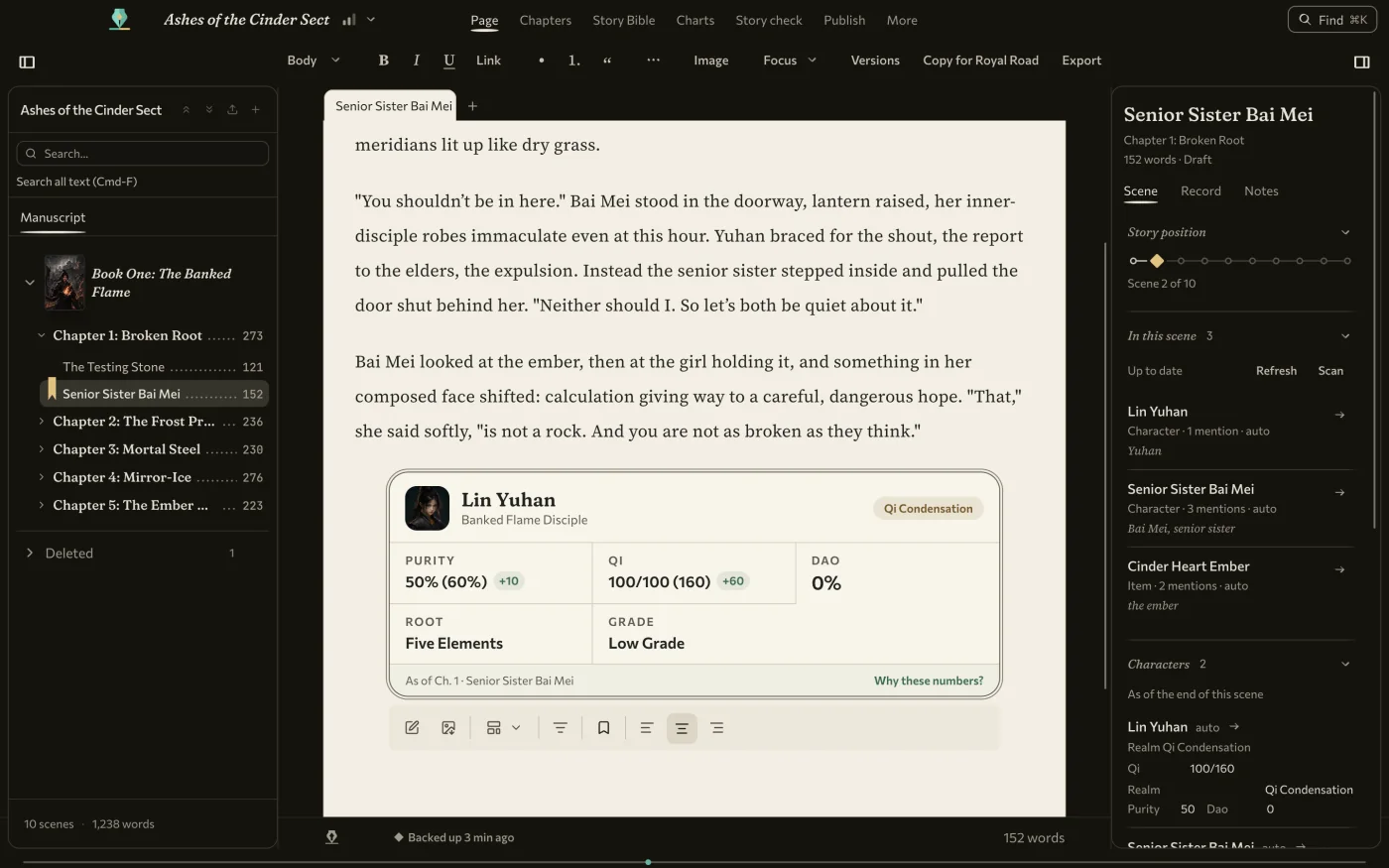
The craft is in small places:
- Your book's title sits in italics at the top of the window, the way a running head sits at the top of a printed page.
- Four typefaces ship inside the app: Commissioner for the interface, Fraunces for titles, Source Serif 4 for your page, JetBrains Mono for numbers.
- Buttons are cut like pen keys. A text field is a line to write on.
- Menus and Find are index slips with dot leaders. Tooltips are margin notes. Dialogs are plates with a double hairline.
- The Saved pill became a small pen flourish and the word Saved.
- The caret is jade, the colour of the nib. Selected text is a wash of ink. Scrollbars are a thin pen line.
- The mark is new too: a standing nib, in the top bar, on the Dock icon and on the installers.
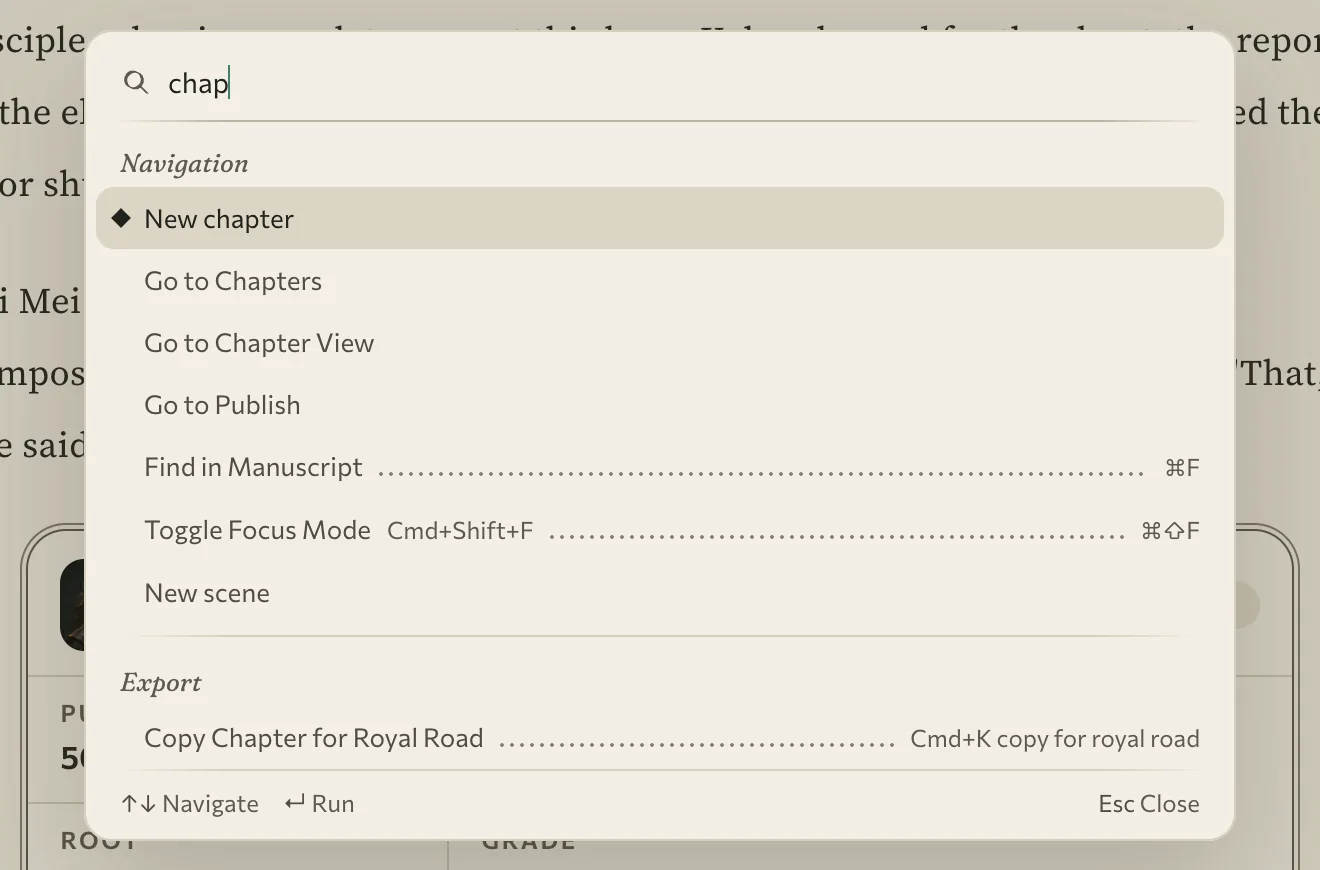
The layout follows the same belief: the page is where you work, so everything else should be within reach of it and never on top of it. The page sits in the centre of the window. Chapters and the scene panel open as wings in its margins. The left rail is gone, replaced by a top bar of plain words: Page, Chapters, Publish, More, Find. Moving between them no longer waits on a fade.
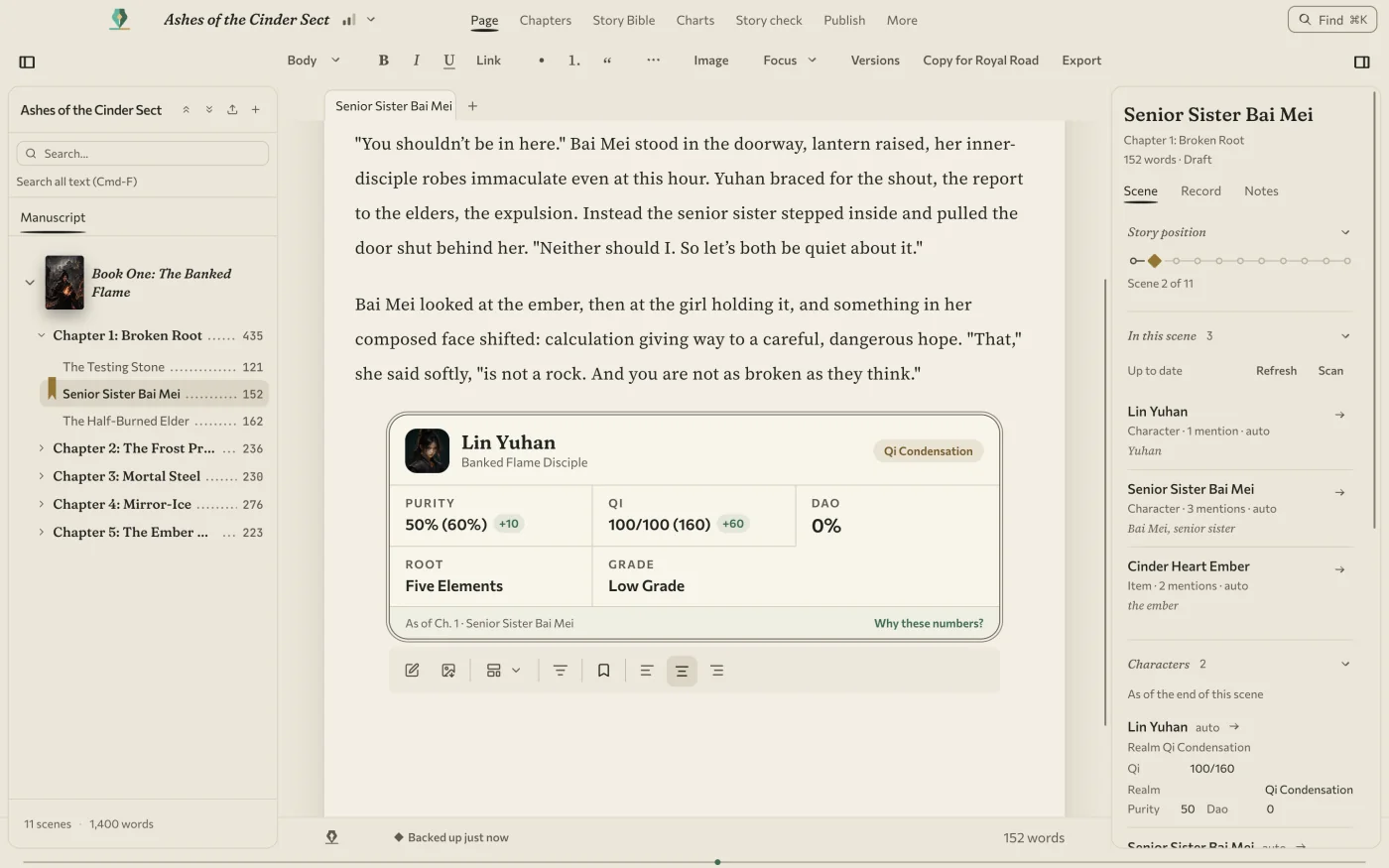
The look is always on, in light and dark, and it is not finished: the main button on each screen is still moss green, and plenty of icons still come from the old set. I would rather say so than have you spot it.
For your next chapter: you sit down, your title is at the top, the page is in the middle, and nothing on the screen is louder than your sentence.
Three steps and a blank page
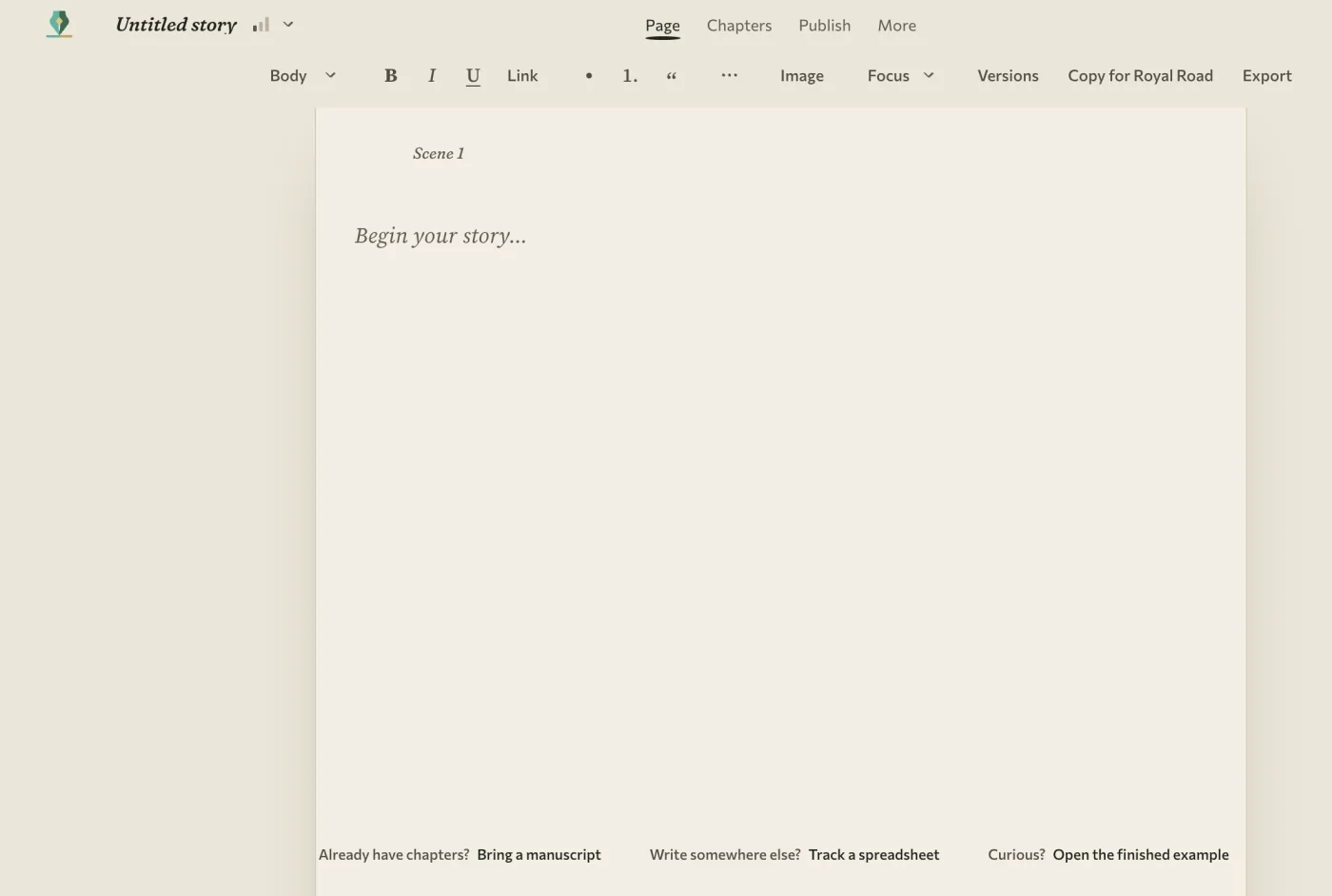
A first launch now opens on a blank page: an untitled story, ready to type in, no click needed. Under it sit three quiet links, to bring a manuscript, track a spreadsheet, or open the finished example.
Each book also has a step: Just write, Track my story, or Run the whole system. A step only changes what sits in front of you. It never turns a feature off. A new draft can stay quiet while your long-running serial keeps every tool up front.
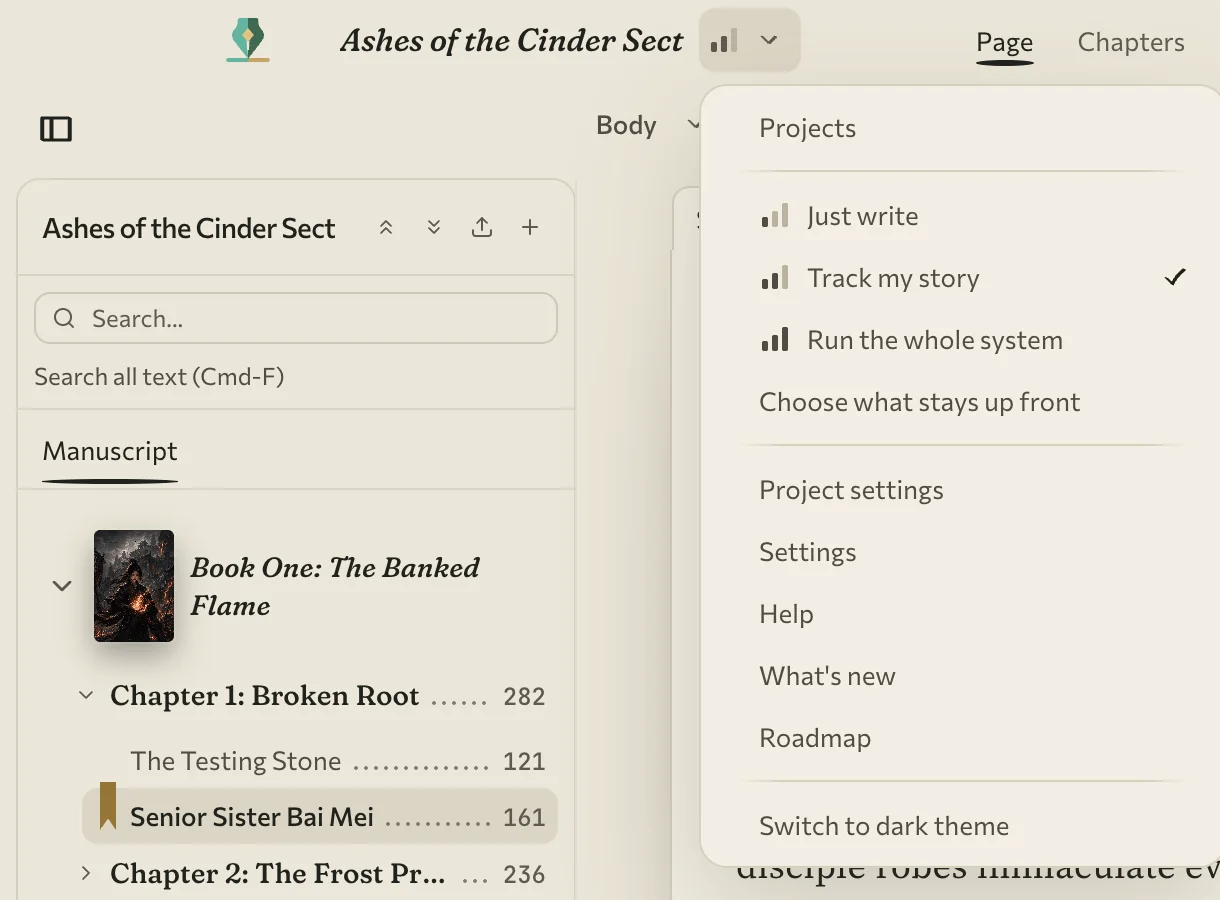
If you are coming from 0.7.5, your books open on Run the whole system. The top bar of words replaces the left rail for you too. The layout changed; the features did not.
A status box you can trust
A serial is a living record. Every chapter adds to what is true, and the tool's job is to know what was true where. That has always been the promise here: the numbers in a status box are the story's numbers as of that scene.
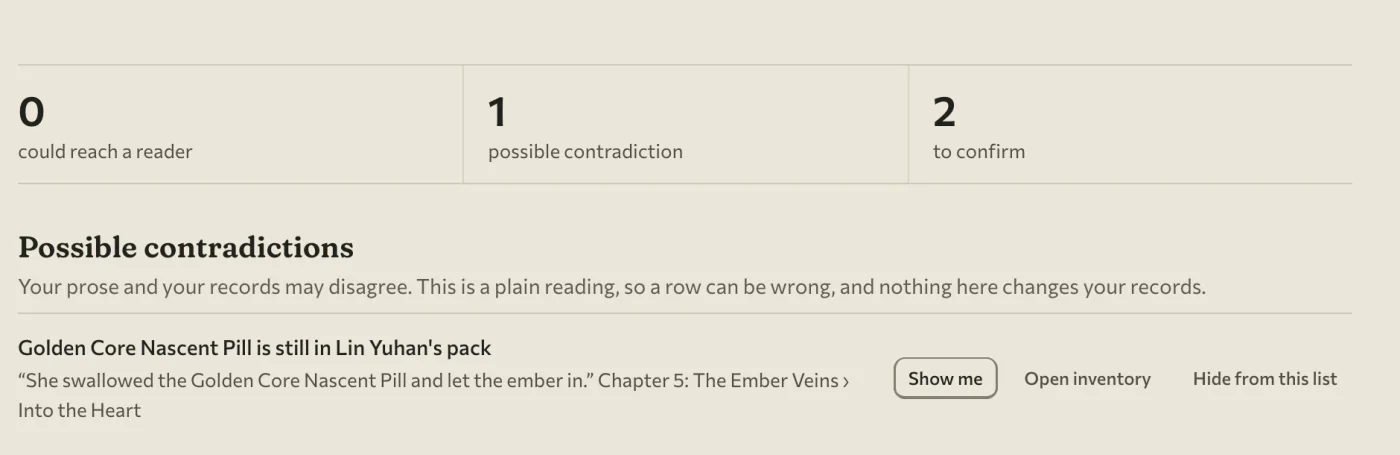
Somebody in your comments will find the one that is wrong. Story check is a new page that finds it first. It is one ranked list of the problems a reader could see. Stat blocks that disagree with the story come first, then contradictions in the prose, such as an item that was used up and is somehow still in the bag. For each one you choose Update block or Keep as written, or update them all at once. Keep as written matters. Sometimes the box is wrong on purpose, and the app should not argue with you. Publish runs the same check inline on the chapter you are about to post.
More in the same spirit:
- New characters no longer arrive with invented D&D stats. They join your book's own stat system with an empty sheet, and Fill in starting values is there when the story needs it.
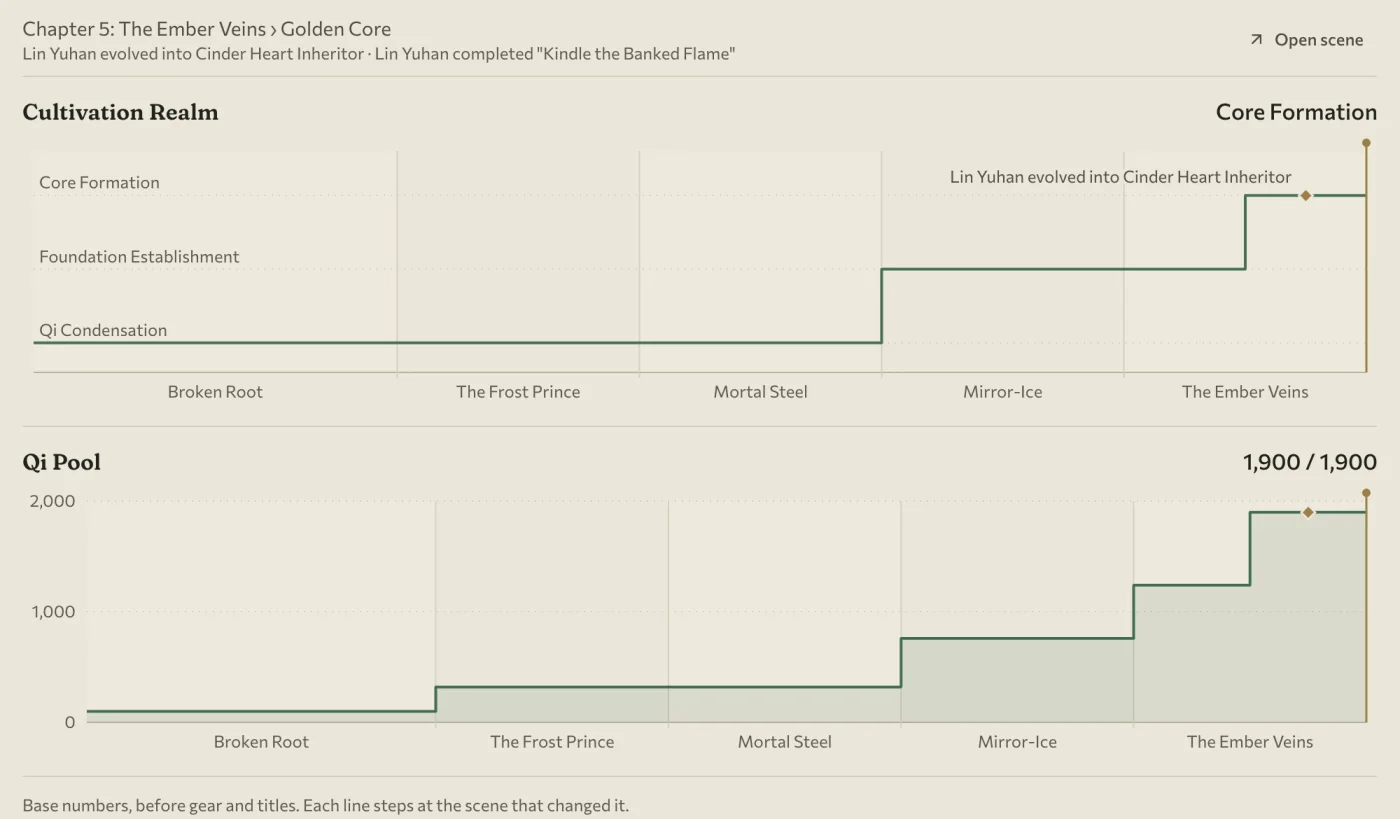
- A new Charts page draws level, HP and pools across your chapters.
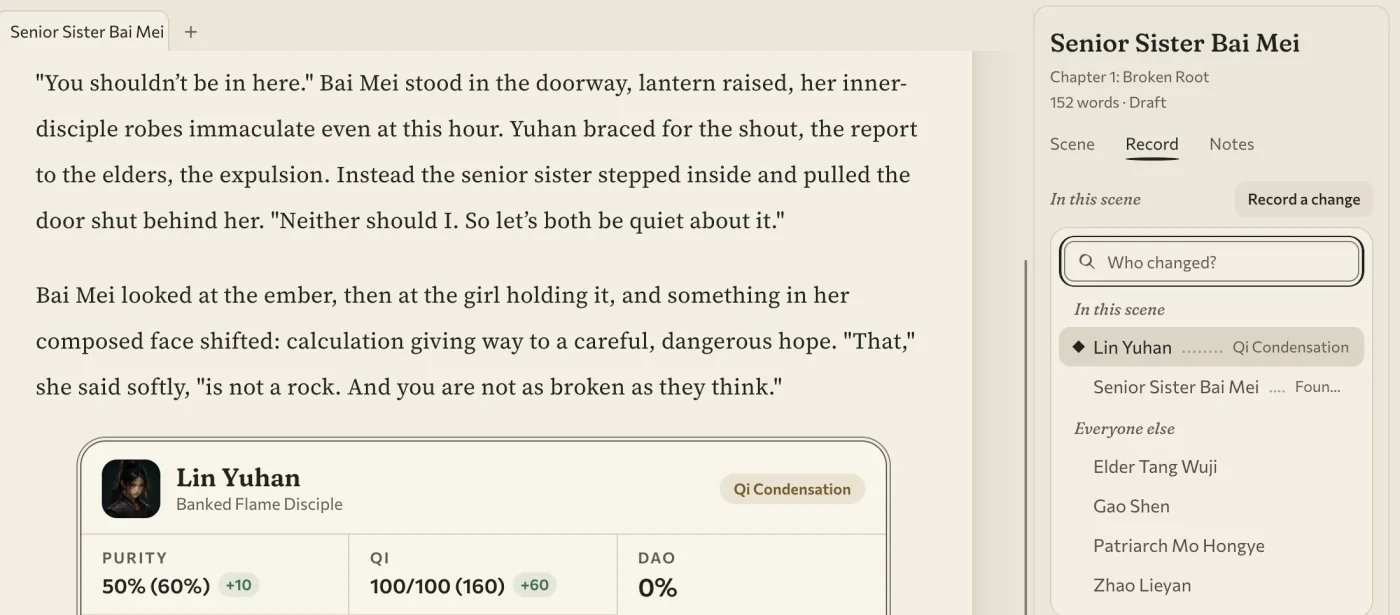
- A Record tab beside the page lists the people, places and things in the scene and marks who the sentence names. Record a change from there: pick who, then what. Writing the result into your manuscript is now something you opt into.
- Set aside this line keeps a line in a Tray for later without touching your prose.
- Plot threads made by hand on the Quest Board survive scene edits, merges, deletes and a project restore, and threads export to Markdown or BBCode.
- Give a book a word target and a finish-by date, and Writing activity does the daily maths. The posting queue shows your chapters per week.
For your next chapter: run Story check before you post, and let the comment section find something else.
Posting day
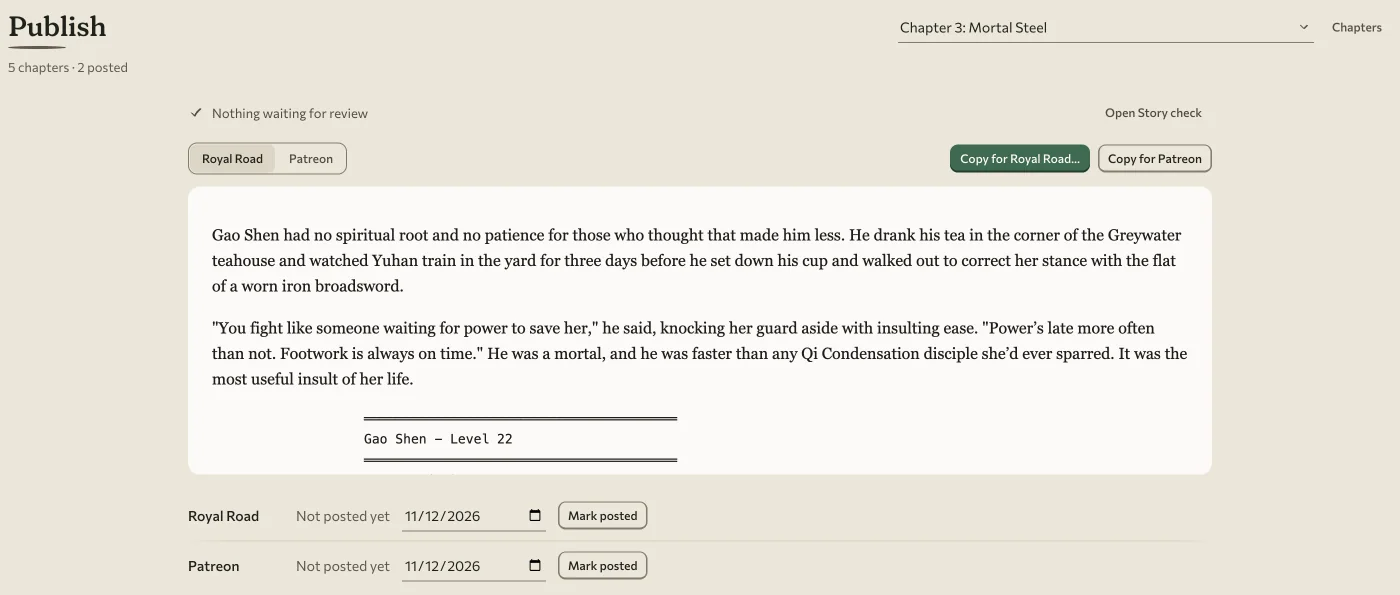
Publish used to open on Chapter 1. On an 81-chapter serial, the chapter you came for was about 6,500 pixels of scrolling away. It now opens on the next chapter to post, with the preview and the copy side by side and Mark posted in plain sight.
Long scenes, and a budget I missed
Some of you write a whole arc as one scene. The page used to turn the entire scene into data on every keystroke. On an Apple M3, a key pressed in a 300,000-word scene typically waited 132 to 209 milliseconds.
I set a budget of 50, and I missed it. The slowest key in twenty still takes 106 to 158 milliseconds. What did improve: an autosave at that size used to freeze the app for 722 milliseconds and now takes 111, and the longest stall went from about a second to about a third of one. Long scenes type much better. They are not instant, and I have not re-measured the million-word case.
Smaller repairs
- Replace All no longer lets you type before the page reloads and then wipes what you typed. With a Turkish İ in the paragraph, it used to rewrite the prose around each match.
- Esc while typing no longer throws you out of the page; the next words used to vanish.
- On Italian, Spanish, Swiss, Belgian and Canadian French Windows keyboards, typing
[or]with AltGr no longer jumps chapters. - Scenes keep saving after an
@link picks up a duplicate row. Before, they stopped. - A second quest progress update can no longer fail and take the first with it.
- A failed location delete no longer erases its map picture.
- A bug on one page no longer blanks the whole window, and leftover Word or PDF bookkeeping can no longer stop the app from starting.
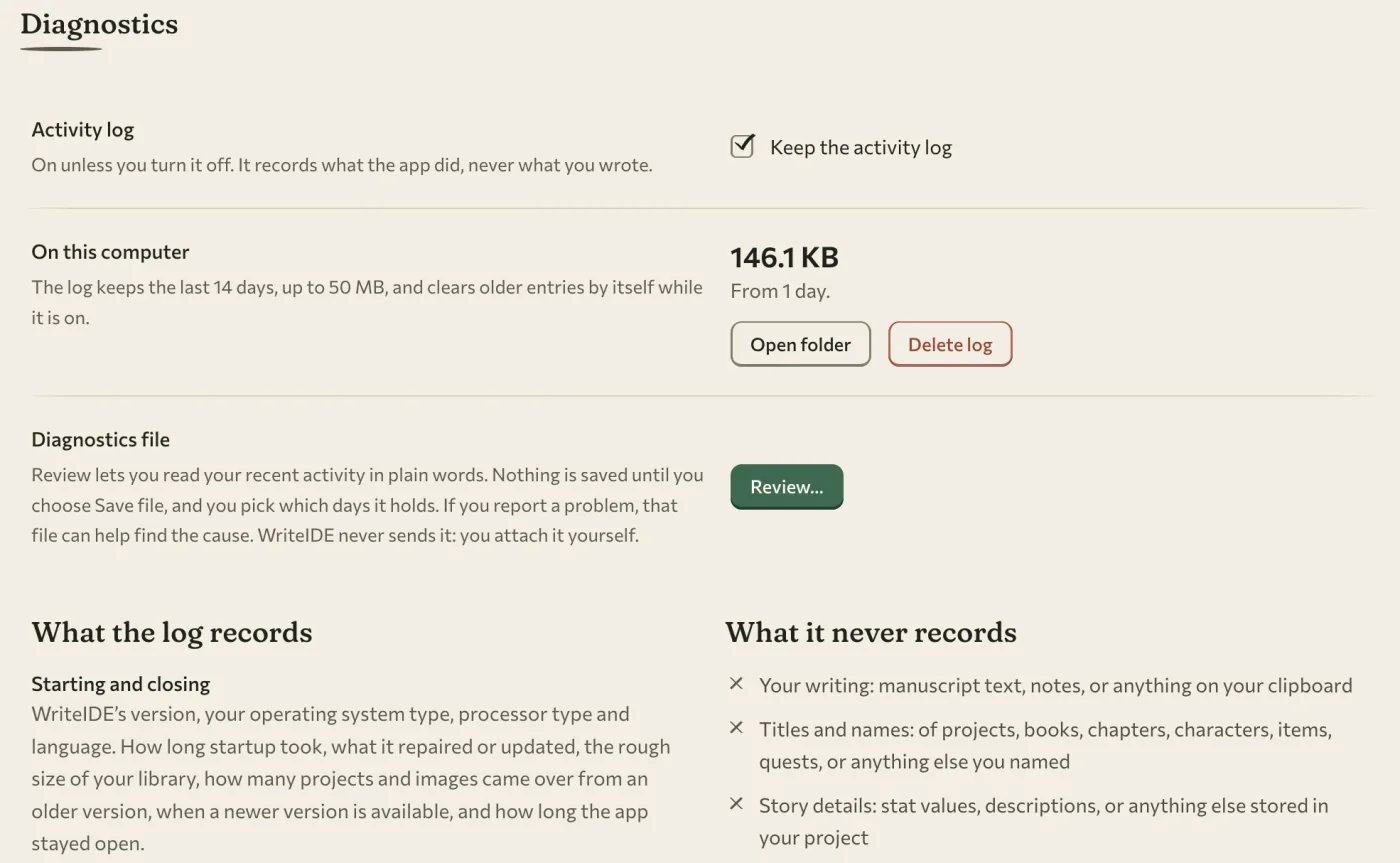
- A local event log is on by default. It is never uploaded, and it leaves out manuscript text, titles, names and file paths. Settings › Diagnostics shows what it holds, with a switch and a Delete button.
On the website
Ten new free tools joined the site, each one a small job a spreadsheet does badly: an Inventory Timeline, a Fantasy Currency Ledger, a Skill Tree Planner, a Notification Pacing Checker and six more. The download page can also send the installer link from your phone to your computer.
What is not here yet
- Editing your book in Word and sending the changes back is not in this build. Neither is reading comments from a returned PDF.
- Import brings your words, not your numbers. Nobody forty chapters in wants to back-fill a stat history by hand, and today you would have to.
- PDF does not support Hebrew, Arabic, Chinese, Japanese, Korean or emoji.
- Sync does not exist. The folder copy above is the honest version.
- The look still has green buttons and borrowed icons, as confessed.
About the missing numbers
If you follow this journal, you have seen pages for 0.7.6 and 0.7.7. Neither became a stable release. 0.7.6 was staged and never published. 0.7.7 was ready when a last read of the build found that one unreadable picture in a manuscript could stop the whole Word export, and the portable backup with it. I would rather skip a number than ship that.
Counting 0.7.4, that is three skipped numbers in one series, a record I would like to stop extending. The work behind both versions is in this release. A few of you ran the early builds and have seen parts of it. Thank you for going first.
Updating from 0.7.5
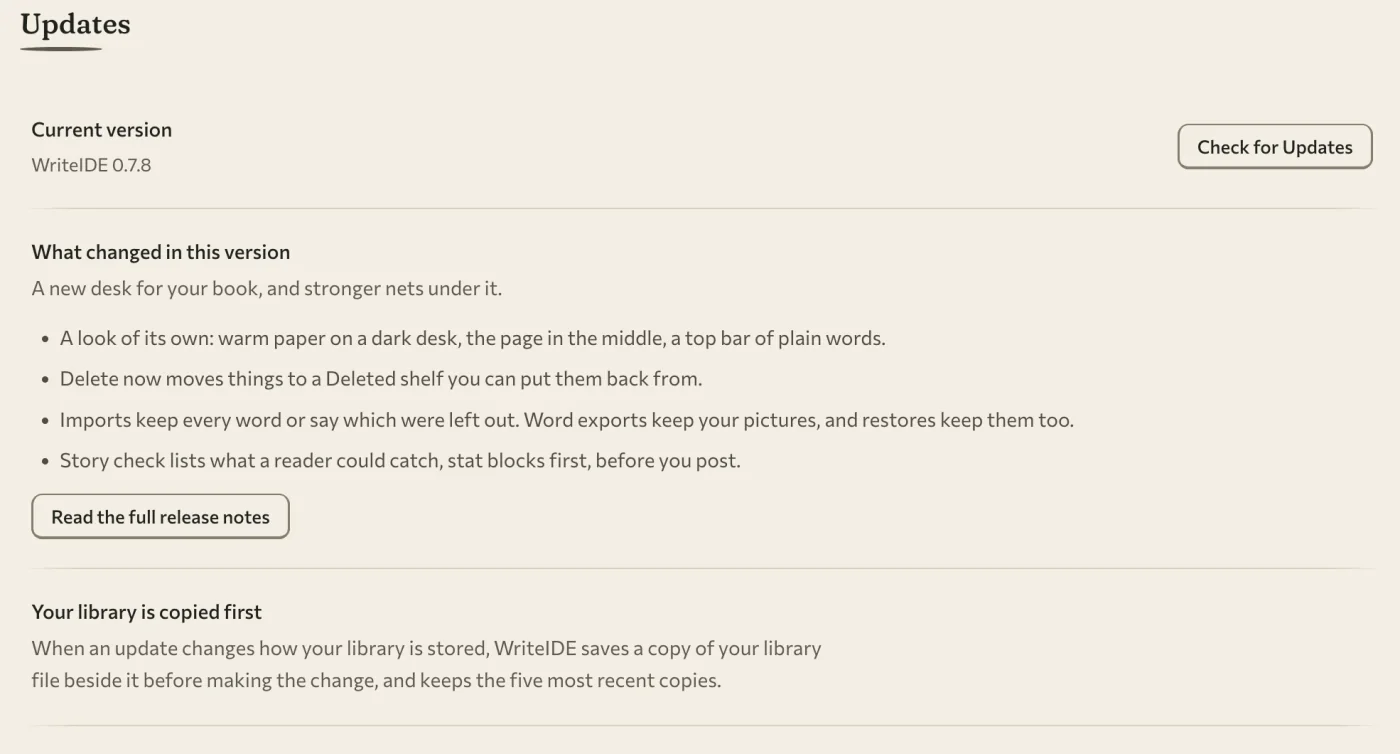
- Your library comes forward untouched. The six storage changes only add. No table is dropped, no row is rewritten, and no prose, stat, item, quest or version is changed.
- An earlier copy is kept. Before any of those changes run, WriteIDE copies your library file beside itself and keeps the five newest copies.
- Back up first anyway. Going back to an older version after opening the upgraded library is unsupported: an older app refuses backups made by this one. The other direction works, so backups made by 0.7.5 restore here.
- One limit on old backups. Backups made by 0.7.5 do not contain pictures used only by deleted scenes. New ones do.
- Mac: this build needs Apple silicon and macOS 13 Ventura or later. A Mac on macOS 12 is not offered the update and stays on 0.7.5.
- Linux: the build opens on Ubuntu 22.04, Debian 12 and RHEL 9.
- Windows: the installer is signed. I did not walk a full upgrade through the installer wizard for this release, so "back up first" counts double.
- How: use Check for Updates in Settings, or get the installer from the download page.
Where this goes next
The gap I named above is the next piece of work: bring your book, see your numbers. You should be able to hand WriteIDE the serial you already wrote and stand anywhere in it, with the stats as they were in that chapter, without typing a hundred chapters of history back in.
Alongside it, every feature that is switched off gets finished and switched on, or gets removed. Nothing stays parked. And the Ink pass continues until the last green button is gone.
I am not putting dates on any of it. Three skipped version numbers taught me to promise the work and leave the calendar out of it.
One thing I can promise: if WriteIDE ever loses a word of yours, tell me, and it becomes a line in a post like this one.
WriteIDE is still free, local-first and account-free. Download 0.7.8, or use Check for Updates in the app.
What changed in 0.7.8
The sections above tell the stories. This is the whole release as a list, for anyone who skims.
New
- A look of its own, called Ink: warm paper on a dark desk, written in one ink colour, in light and dark.
- Four typefaces ship inside the app: Commissioner, Fraunces, Source Serif 4 and JetBrains Mono.
- A new mark, the standing nib, in the top bar, on the Dock icon and on the installers.
- New chapter and scene markers drawn for WriteIDE.
- The page sits in the middle of the window; Chapters and the scene panel open in its margins.
- A top bar of words (Page, Chapters, Publish, More, Find) replaces the left rail.
- Settings, Help, Projects, Quest Board, Versions, Setup, Story Bible, Reader Codex and Publish are all redrawn in the new look.
- Three steps per book: Just write, Track my story, or Run the whole system. A step never turns a feature off.
- A first launch opens on a blank untitled story, with links to bring a manuscript, track a spreadsheet or open the example.
- A quiet note in the margin can offer to move a book up a step when your writing suggests it. It never edits your prose.
- A whole-book view shows every scene on one thread beside the posting queue.
- The story line zooms in for long serials.
- A Deleted shelf at the foot of the chapter list: put back a deleted scene, chapter or book with its recorded changes.
- Versions can put back a scene, a chapter or a whole book, and saves a "Before put-back" version first.
- Story check: one ranked list of what a reader could catch, with Update block, Keep as written or Update all.
- A Record tab beside the page lists the people, places and things in the scene and marks who the sentence names.
- Record a change from the Record tab: pick who, then what.
- Set aside this line keeps a line in a Tray without touching your prose.
- A Charts page draws level, HP and pools across your chapters.
- Give a book a word target and a finish-by date; Writing activity does the daily maths.
- The posting queue shows your chapters per week.
- Quest Board plot threads export to Markdown or BBCode.
- Copy my library to a folder, and Bring in from a folder, for moving to another computer.
- WriteIDE names the computer your library is already open on before it touches the file.
- A local activity log, on by default and never uploaded, with its switch and Delete in Settings › Diagnostics.
Improved
- Your typing reaches the recovery journal within one frame of the screen.
- Chapter View has its own crash recovery.
- A recovery copy is kept unless the whole scene is already saved.
- Import keeps opening Part and Act headings, one-cell boxes, pictures and list numbering.
- Simple tables from Word and Google Docs import as real tables.
- The import review offers plain chapter lines, such as a bare "7", and splits for very long scenes.
- Word exports keep your embedded pictures at their own proportions.
- PDF prints Cyrillic, Greek and Central European text.
- PDF prints the symbols a status screen leans on: arrows, stars, check marks, ≥, ≤, ≠, ∞, √.
- A character PDF cannot print shows as a visible placeholder, and the export warns you.
- Backups carry pictures used only by deleted scenes.
- Publish opens on the next chapter to post, with the preview and the copy side by side and Mark posted in plain sight.
- Publish runs Story check on the chapter you are about to post.
- New characters join your book's own stat system with an empty sheet, and Fill in starting values is there when you need it.
- Writing a recorded change into your manuscript is now something you opt into.
- Moving between places no longer waits on a fade.
- Long scenes type much better. They are not instant yet.
- Back and Forward put the caret back where you left it when the text has not changed.
- Editing stats shows plain Save and Cancel buttons.
- The relationship graph opens with more room, a focus mode and a List switch.
/lootkeeps the quantities you typed, and a missing item can be created from its confirm box.- Every confirmation uses the app's own dialog.
- One shortcut list is shared by Help, Settings and the shortcut overlay.
- Chapter drag grips work from the keyboard, and about 100 form labels are tied to their fields for screen readers.
Fixed
Your words
- Words typed just before a crash or a force-quit are no longer lost.
- A second crash no longer throws away recovered words you had not decided about.
- The offer to recover your words appears on screen, not thousands of pixels away.
- Replace All no longer wipes text you typed before the page reloaded.
- Replace All no longer rewrites the prose around each match in a paragraph with a Turkish İ.
- Esc while typing no longer throws you out of the page.
- Scenes keep saving after an
@link picks up a duplicate row. - AltGr
[and]no longer jump chapters on Italian, Spanish, Swiss, Belgian and Canadian French Windows keyboards.
Import
- Import keeps the text before the first chapter marker.
- Import keeps paragraphs that begin with "Part 2" or "Prologue".
- Import no longer flattens one-cell boxes into plain lines.
- Import stores the pictures inside your manuscript.
- Plain-text import no longer swallows paired asterisks.
- When something cannot be carried, the import names the words it left out.
Backups
- Markdown books with an
imagesfolder back up again. - On a Mac, backups and update notices keep running after you close the window and reopen it from the Dock.
- A restore that succeeds no longer deletes the pictures it just restored.
- The plain-text copies inside a milestone backup are readable again.
- Automatic backups are readable by your account only on Mac and Linux.
Export
- An export stops and says so when a scene fails to convert, instead of reporting success.
- One unreadable picture no longer stops a Word export or the portable backup; it is skipped with a notice.
- Word pictures are no longer forced into one fixed box.
- EPUB keeps emoji and rare characters.
- EPUB keeps the prose after a code block and no longer invents chapters.
- An EPUB still opens when a title holds an invisible control character.
- Markdown export treats text that looks like HTML as text.
Your story's record
- Hand-made Quest Board threads survive scene edits, merges, deletes and a project restore.
- A second quest progress update can no longer fail and take the first with it.
- Learning or removing a skill, and removing an item, now leave a line in the character's history.
- Quest Board counts chapters from 1, and "at risk" matches the filter.
Elsewhere
- A failed location delete no longer erases its map picture.
- A bug on one page no longer blanks the whole window.
- Leftover Word or PDF bookkeeping no longer stops the app from starting; that project is set aside and the app opens.
Under the hood
- Electron 42 to Electron 45.
- Six small additions to how your library is stored. Nothing is dropped or rewritten.
- Before those changes run, your library file is copied beside itself, and the five newest copies are kept.
- The app's window runs in Electron's sandbox, a standard security setting.
- One native image library was removed from the app.
- Platform and upgrade details are in Updating from 0.7.5, above.
On writeide.com
- Ten new free tools, including an Inventory Timeline, a Fantasy Currency Ledger, a Skill Tree Planner and a Notification Pacing Checker.
- The tools page has search, previews and next steps.
- Three new comparison pages: WriteIDE against Clifford, PlotWrite and Understory.
- A public Help and FAQ page.
- The download page can send the installer link from your phone to your computer.
Check a character at the right point in your story, preview the chapter you mean to post, and get back to the sentence you were writing. WriteIDE 0.7.7 also improves recovery, Word exports, and Quest Board exports.
10 min readWriteIDE 0.7.6: faithful exports, clearer screens, fewer lost wordsPDFs keep Cyrillic, Greek, accented text and common stat symbols readable, unsupported characters get a visible warning, and exports, recovery, navigation and everyday labels are clearer.
7 min readSometimes things don't always go as planned: 0.7.4, the release that never wasWriteIDE 0.7.4 never shipped. I skipped a version number, left a page promising it, and everything prepared for it landed in 0.7.5. Sorry!
2 min readNotes worth sending
Release notes when a version ships, plus Lab notes and guides. No weekly filler.