Your numbers drift
Start with WriteIDE.
- Best fit for point-in-time stats and deterministic progression continuity.
- Keeps changes, formulas, equipment, skills, quests, and manuscript blocks in one local project.
Six useful answers, not one fake winner
Writing the prose, controlling a 200,000-word manuscript, tracking progression, building a world, and co-editing are different jobs. Start with the bottleneck that is costing you chapters.
Short verdict
Choose WriteIDE for scene-aware progression continuity, Scrivener for deep long-form organization and Compile, Dabble for a polished cloud-first novel workflow, Campfire for modular worldbuilding, Obsidian for a build-your-own local knowledge base, or Google Docs plus Sheets for live collaboration and familiarity.
Shipped product evidence
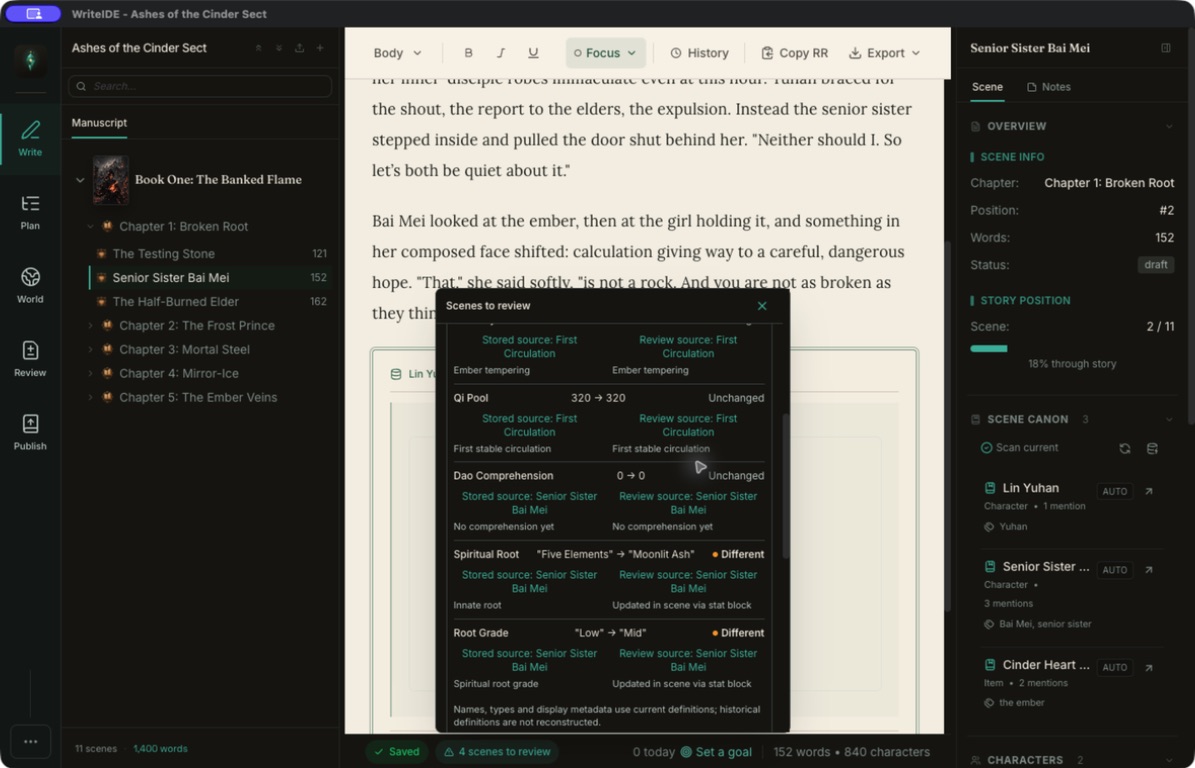
The fast decision
Start with WriteIDE.
Start with Scrivener or Dabble.
Start with Campfire, Obsidian, or Google.
Comparable facts and tradeoffs
“Main compromise” describes the tradeoff for this specific use case, not a defect in the product.
| Criterion | Best for | Workflow shape | Cost shape | Main compromise for LitRPG |
|---|---|---|---|---|
| WriteIDE | Progression continuity and point-in-time state | Local desktop manuscript plus story-state ledger | Free; no account | No mobile or live co-authoring; intentionally narrower than general writing suites |
| Scrivener | Long manuscripts, research, restructuring, and Compile | Installed project with Binder, corkboard, outliner, and research | Paid per-platform license; 30 use-day desktop trial | Progression history requires author-built notes, metadata, or a companion ledger |
| Dabble | Guided cloud drafting across devices | Synced novel project with Plot Grid, goals, co-authoring, desktop, web, and mobile | Subscription after a 14-day trial; lifetime Author option listed | Account and paid-plan model; no purpose-built scene-aware stat ledger claimed |
| Campfire | Modular worldbuilding and connected lore | Manuscript plus characters, timelines, maps, magic, systems, relationships, and other modules | Limited free use; subscription and lifetime options | Free limits vary by module; browser and mobile require internet while desktop supports offline work |
| Obsidian | A private, build-your-own local knowledge base | Local files and linked notes, extended by your own structure and plugins | Core app free; optional paid Sync and Publish | You design the novel workflow, progression schema, and publishing pipeline yourself |
| Google Docs + Sheets | Live co-writing, comments, and a familiar document-plus-grid stack | Cloud documents and spreadsheets with permissions, revision history, and optional offline access | Consumer access available with a Google account; some features require Workspace plans | Prose and state remain separate unless you build conventions or automation |
Evidence: WriteIDEWriteIDELiterature & Latte (opens in a new tab)Literature & Latte (opens in a new tab)Dabble (opens in a new tab)Dabble (opens in a new tab)Campfire (opens in a new tab)Campfire (opens in a new tab)Obsidian (opens in a new tab)Obsidian (opens in a new tab)Google Workspace (opens in a new tab)Google Workspace (opens in a new tab)
The detailed shortlist
01 · Best for progression continuity
Best for: Stat-heavy LitRPG and progression fantasy where the answer changes by chapter.
WriteIDE records canonical changes against scenes and rebuilds stats, equipment, skills, quests, and relationships from a selected story position. Those values can also feed native manuscript blocks. It is free, local-first, and requires no account.
Tradeoff: It is a younger, genre-specific desktop app with no mobile client or live co-authoring. Authors who need Scrivener-level Compile breadth may prefer a companion workflow.
02 · Best for long-form manuscript control
Best for: Authors whose hard problem is structuring, researching, revising, and compiling a large book.
Scrivener combines a Binder, corkboard, outliner, collections, metadata, split research, targets, and an extensively configurable Compile workflow. It supports macOS, Windows, and iOS through separate products.
Tradeoff: Its flexible metadata can describe almost anything, but its official feature set does not provide a built-in scene-aware progression ledger. Stat-heavy authors usually design that layer themselves or pair another tool.
Evidence: Literature & Latte (opens in a new tab)Literature & Latte (opens in a new tab)Literature & Latte (opens in a new tab)
03 · Best for guided cloud-first novel drafting
Best for: Novelists who want one approachable project across browser, desktop, phone, and tablet.
Dabble combines manuscript organization, a Plot Grid, character and story notes, goals, focus tools, cloud storage and auto-sync, co-authoring, and mobile access. Its official feature page lists those capabilities for its cloud workflow.
Tradeoff: It is account- and subscription-centered after the trial. The published feature set is built for novel planning and drafting rather than point-in-time LitRPG state.
Evidence: Dabble (opens in a new tab)Dabble (opens in a new tab)
04 · Best for modular worldbuilding
Best for: Authors who want many connected lore types around the manuscript.
Campfire offers dedicated modules for characters, timelines, maps, calendars, magic, languages, relationships, items, species, cultures, systems, and more. Browser, desktop, and mobile experiences cover different parts of that system, with collaboration and export in the wider platform.
Tradeoff: The free plan limits elements by module, and the platform matrix matters: Campfire says the desktop app supports offline work while browser and mobile access require internet.
Evidence: Campfire (opens in a new tab)Campfire (opens in a new tab)
05 · Best build-your-own local knowledge base
Best for: Authors who think in linked notes and want ordinary local files under their control.
Obsidian stores data locally, requires no signup for the core app, and does not collect telemetry according to its official pricing and data statement. Optional Sync adds cross-platform synchronization, version history, offline work, and end-to-end encryption.
Tradeoff: It is a flexible notes environment, not a ready-made novel or LitRPG state model. The author chooses folder structure, properties, plugins, templates, and export conventions.
Evidence: Obsidian (opens in a new tab)Obsidian (opens in a new tab)
06 · Best for live collaboration and familiarity
Best for: Co-authors, editors, and teams who need simultaneous work with almost no onboarding.
Docs and Sheets center co-editing, comments, permissions, and revision history across web and mobile. Docs supports Word import and both products can be configured for offline access. Sheets remains an excellent place to test formulas and models.
Tradeoff: The manuscript and progression model normally live in separate files. Historical story state, stable scene identity, and reader-facing stat blocks are conventions the team must create and enforce.
Evidence: Google Workspace (opens in a new tab)Google Workspace (opens in a new tab)
How the picks were made
A feature checklist rewards the product with the longest page, even when the features solve a different problem. This guide instead asks six questions: Can it control a long manuscript? Can it reconstruct progression at an earlier scene? Can it keep lore connected? Can collaborators work at once? Can the author work offline and control the files? What ongoing cost and maintenance does the workflow create?
Only official product pages and WriteIDE 0.7.3's shipped record support product claims. “Best” means best fit for the named bottleneck. It does not mean every author should migrate, and it does not score community size, customer support quality, or unverified roadmap promises.
Stacks that make sense
A good stack does not duplicate responsibility. Scrivener plus WriteIDE lets Scrivener own prose and Compile while WriteIDE owns progression history. Google Docs plus WriteIDE lets collaborators shape prose while one canonical local ledger answers continuity questions. Obsidian plus Scrivener separates linked world notes from the production manuscript.
The dangerous stack is the one with three competing truths. Decide which file owns prose, which system owns canonical state, and how an approved change crosses between them. If no one can answer those three questions, another app will add tabs without reducing errors.
Scrivener + WriteIDE: manuscript authority + progression authority.
Google Docs + Sheets: collaborative prose + flexible numerical work.
Campfire + Dabble: deep worldbuilding + guided cloud drafting, if the subscription stack earns its cost.
Obsidian + any editor: local knowledge base + chosen manuscript surface.
Evidence: WriteIDEGoogle Workspace (opens in a new tab)Campfire (opens in a new tab)Obsidian (opens in a new tab)
A 30-minute decision test
Do not migrate a whole series to evaluate software. Copy one troublesome chapter, one character with several changes, and one piece of world lore. Reorder a scene. Ask for the old stat sheet. Export a sample. Invite the collaborator who will really use it. The product that removes your recurring failure with the least new maintenance is the right first choice.
Re-check price, platform, and account details on the linked vendor pages before committing. Those facts change faster than the underlying workflow distinctions.
Common decision questions
For purpose-built progression tracking, WriteIDE is free and local-first. For a configurable local knowledge base, Obsidian's core app is free. Google Docs and Sheets offer familiar consumer access. The best choice depends on whether your bottleneck is state, notes, or collaboration.
Yes as a companion workflow. WriteIDE offers a tracker-only start path for authors who write elsewhere. Import a manuscript copy or create a chapter skeleton, then keep the external editor as prose authority and WriteIDE as the continuity ledger. This is not a claim of live two-way sync.
Google Docs and Sheets are the clearest low-friction choice for live co-editing and comments. Dabble also advertises co-authoring inside a novel-specific cloud workflow. WriteIDE does not offer live co-authoring.
Campfire is the most ready-made modular worldbuilding option in this list. Obsidian is the most configurable local option. WriteIDE is strongest when the system must change through story time and feed character state or manuscript blocks.
Every product claim and official source was reviewed on September 10, 2026. Pricing and platform details can change, so follow the source links before purchasing.
Audit the comparison
This guide is published by WriteIDE, which is one of the products evaluated. Rankings are by workflow fit, not market size or sponsorship. There are no affiliate links; every external claim points to an official product source checked on the date shown.
Checked for: Shipped point-in-time state, progression rules, manuscript blocks, spreadsheet trackers, export formats, and platform support.
Checked for: Local storage, account, telemetry, and network-behavior claims for WriteIDE 0.7.3.
Checked for: CSV and Excel tracker creation, current-stats CSV export, reviewed WriteIDE-format workbook import, prepared chapters, and author-control constraints.
Checked for: Binder, corkboard, outliner, research, metadata, collections, targets, platform support, and export capabilities.
Checked for: Thirty use-day trial, per-platform licensing, and major-versus-minor update policy.
Checked for: Current desktop and iOS availability, platform requirements, and bundle structure.
Checked for: Plot Grid, manuscript organization, goals, cloud sync, co-authoring, mobile support, and export.
Checked for: Current trial, subscription structure, plan boundaries, and lifetime option.
Checked for: Worldbuilding modules, browser, desktop, mobile, offline behavior, collaboration, and export.
Checked for: Free-plan limits plus subscription and lifetime purchase models.
Checked for: Free core application, no required signup, local files, no telemetry, and optional paid services.
Checked for: Optional cross-platform sync, version history, offline work, and end-to-end encryption.
Checked for: Live co-editing, comments, revision history, mobile access, offline editing, and Word import.
Checked for: Formulas, tables, version history, comments, permissions, co-editing, and cross-device access.
Last reviewed . Re-check vendor pages before purchasing.
Free tools for this
Small tools for jobs this comparison touches. They run locally, need no account, and upload nothing you type.
Build a LitRPG character sheet with class, level, stats, skills, and gear, then copy Royal Road HTML or export a shareable PNG.
Royal Road Blue Box GeneratorBuild LitRPG system-message blue boxes for Royal Road, then copy clean chapter HTML or download a shareable PNG. Free and browser-local.
XP Curve VisualizerCompare RPG leveling curves, test a custom XP formula, and export level tables or chart images. Free for LitRPG authors and browser-local.
LitRPG Stat Block Continuity CheckerCompare two LitRPG stat blocks, highlight every delta, and check changes against expected level-up or loot receipts. Free and browser-local.
Continue the decision